Theme. 프로젝트 생성과 기본 세팅(Spring Tool Suite 4 사용)


File - New - spring starter project 선택
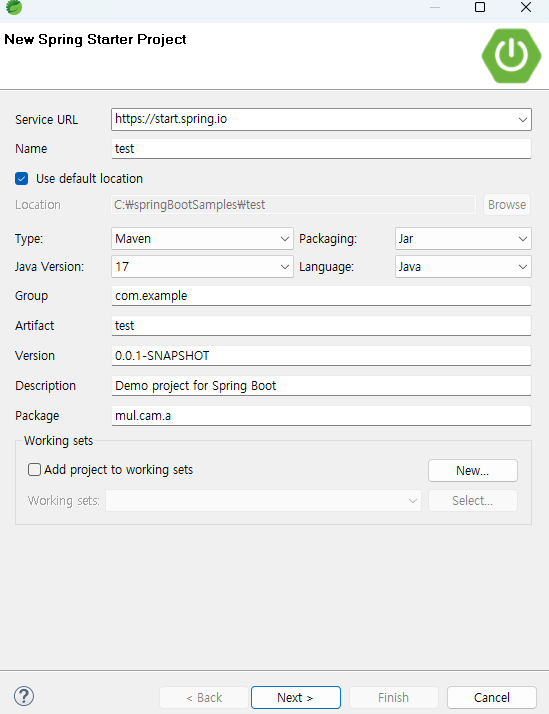


Name에 프로젝트 name 작성 - Maven으로 진행
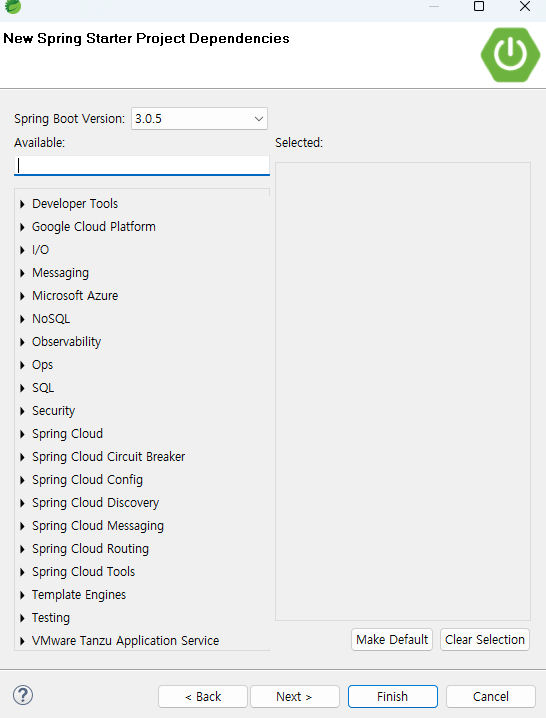


Spring Boot Version 선택


이미 생성했던 sample1이라는 프로젝트를 통해 설명을 진행하도록 한다.

제일 먼저 pom.xml에서 <dependency>를 세팅해줘야 한다.

내장 tomcat을 사용할 것이므로 아래와 같이 추가해줘야 한다. 중간중간 version에 대한 부분은 새로 만들때마다 바뀌게 될 것이다.


1
2
3
4
5
6
7
8
9
10
11
12
13
14
15
16
17
18
19
20
21
22
23
24
25
26
27
28
29
30
31
32
33
34
35
36
37
38
39
40
41
42
43
44
45
46
47
48
49
50
51
52
53
54
<?xml version="1.0" encoding="UTF-8"?>
<project xmlns="http://maven.apache.org/POM/4.0.0" xmlns:xsi="http://www.w3.org/2001/XMLSchema-instance"
    xsi:schemaLocation="http://maven.apache.org/POM/4.0.0 https://maven.apache.org/xsd/maven-4.0.0.xsd">
    <modelVersion>4.0.0</modelVersion>
    <parent>
        <groupId>org.springframework.boot</groupId>
        <artifactId>spring-boot-starter-parent</artifactId>
        <version>3.0.4</version>
        <relativePath/> <!-- lookup parent from repository -->
    </parent>
    <groupId>com.example</groupId>
    <artifactId>sample1</artifactId>
    <version>0.0.1-SNAPSHOT</version>
    <name>sample1</name>
    <description>Demo project for Spring Boot</description>
    <properties>
        <java.version>17</java.version>
    </properties>
    <dependencies>
        <dependency>
            <groupId>org.springframework.boot</groupId>
            <artifactId>spring-boot-starter</artifactId>
        </dependency>
 
        <dependency>
            <groupId>org.springframework.boot</groupId>
            <artifactId>spring-boot-starter-test</artifactId>
            <scope>test</scope>
        </dependency>
        <!-- 추가된 부분 start -->
        <dependency>
            <groupId>org.springframework.boot</groupId>
            <artifactId>spring-boot-starter-web</artifactId>
        </dependency>
        
        <dependency>
            <groupId>org.springframework.boot</groupId>
            <artifactId>spring-boot-starter-tomcat</artifactId>
        </dependency>
        <!-- 추가된 부분 end -->
        
    </dependencies>
 
    <build>
        <plugins>
            <plugin>
                <groupId>org.springframework.boot</groupId>
                <artifactId>spring-boot-maven-plugin</artifactId>
            </plugin>
        </plugins>
    </build>
 
</project>
 
cs


프로젝트에는 main 메서드가 포함된 클래스가 존재한다.

서버를 실행할 때, 항상 해당 클래스에서 실행하고, 코드의 변경이 있으면 항상 서버를 껐다가 켜서 사용하는 것을 주의하자.


1
2
3
4
5
6
7
8
9
10
11
12
13
14
package mul.cam.a;
 
import org.springframework.boot.SpringApplication;
import org.springframework.boot.autoconfigure.SpringBootApplication;
 
@SpringBootApplication
public class Sample1Application {
 
    public static void main(String[] args) {
        SpringApplication.run(Sample1Application.class, args);
    }
 
}
 
cs


그리고 @Configuration이라는 annotation을 붙이고 WebMvcConfigurer를 상속하여 사용할 클래스를 생성해준다.

해당 클래스는 클라이언트의 접속을 허가해주는 부분을 설정하는 클래스이다.


1
2
3
4
5
6
7
8
9
10
11
12
13
14
15
16
17
18
19
20
21
22
23
24
25
package mul.cam.a;
 
import org.springframework.context.annotation.Configuration;
import org.springframework.web.servlet.config.annotation.CorsRegistry;
import org.springframework.web.servlet.config.annotation.WebMvcConfigurer;
 
// 외부 접속을 허용해주도록 설정!
 
@Configuration    // 설정
public class WebConfigurer implements WebMvcConfigurer{
 
    @Override // 외부접속에 대한 허가를 해주는 부분
    public void addCorsMappings(CorsRegistry registry) {
        
        // 접속 클라이언트를 허가
        registry.addMapping("/**").allowedOrigins("*"); // 모든 접속을 허가
//        registry.addMapping("/**").allowedOrigins("http://localhost:8090"); // 특정 접속을 허가 
        
        
    }


}
 
cs


그리고, src/main/resources 안에 application.properties가 존재하는데, 이 부분에서 server의 port number를 세팅할 수 있다.


임의로 3000으로 port number를 세팅하여 사용하도록 한다.

server.port=3000 이라고 작성하면 된다.


Theme. front-end 부분 만들기 전 back-end에서만의 실행 및 결과


이제 Controller를 만들어서 진행해보도록 한다.

아직, front-end부분을 만들지 않았으므로 결과를 확인하기 위해서는,

http://localhost:3000/매핑 value..... 를 입력하여 확인하도록 한다. (크롬 사용)

중간에 HumanDto 클래스 타입의 객체를 생성하여 사용하는 부분이 있는데, 해당 클래스의 코드는 아래와 같다.


1
2
3
4
5
6
7
8
9
10
11
12
13
14
15
16
17
18
19
20
21
22
23
24
25
26
27
28
29
30
31
32
33
34
35
36
37
38
39
40
41
42
43
44
45
46
47
48
49
package mul.cam.a.dto;
 
public class HumanDto {
    
    private int number;
    private String name;
    private String address;
    
    public HumanDto() {}
 
    public HumanDto(int number, String name, String address) {
        super();
        this.number = number;
        this.name = name;
        this.address = address;
    }
 
    public int getNumber() {
        return number;
    }
 
    public void setNumber(int number) {
        this.number = number;
    }
 
    public String getName() {
        return name;
    }
 
    public void setName(String name) {
        this.name = name;
    }
 
    public String getAddress() {
        return address;
    }
 
    public void setAddress(String address) {
        this.address = address;
    }
 
    @Override
    public String toString() {
        return "HumanDto [number=" + number + ", name=" + name + ", address=" + address + "]";
    }
    
    
}
 
cs


자 이제 HelloController.java의 코드를 살펴보고 결과를 함께 보도록 하자.


1
2
3
4
5
6
7
8
9
10
11
12
13
14
15
16
17
18
19
20
21
22
23
24
25
26
27
28
29
30
31
32
33
34
35
36
37
38
39
40
41
42
43
44
45
46
47
48
49
50
51
52
53
54
55
56
57
58
59
60
61
62
63
64
65
66
67
68
69
70
71
72
73
74
75
76
77
78
79
80
81
82
83
84
package mul.cam.a.controller;
 
import java.util.ArrayList;
import java.util.Date;
import java.util.List;
 
import org.springframework.web.bind.annotation.GetMapping;
import org.springframework.web.bind.annotation.PostMapping;
import org.springframework.web.bind.annotation.RequestMapping;
import org.springframework.web.bind.annotation.RequestMethod;
import org.springframework.web.bind.annotation.RestController;
 
import mul.cam.a.dto.HumanDto;
 
@RestController 
// MVC model에서의 @Controller(controller부분) + @Responsebody(ajax부분)
public class HelloController {
 
    /////////////// 서버(back-end)에서 값을 보내주기만 하는 부분 ////////////////////////
    // http://localhost:3000/
    @RequestMapping(value = "/", method = RequestMethod.GET)
    public String hello() {
        System.out.println("HelloController hello() " + new Date());
        
        return "hello"// ajax를 통해 값을 front-end로 보내준다.
    }
    
    // http://localhost:3000/test
    @GetMapping(value = "/test")
    public String test() {
        System.out.println("HelloController test() " + new Date());
        
        return "테스트";
    }
    
    // http://localhost:3000/human
    @GetMapping(value = "/human")
    public HumanDto getDto() {
        System.out.println("HelloController getDto() " + new Date());
        
        HumanDto human = new HumanDto(1001"홍길동""서울시");
        
        return human;
    }
    
    // http://localhost:3000/get_list
    @GetMapping("/get_list")
    public List<HumanDto> get_list(){
        System.out.println("HelloController get_list() " + new Date());
 
        List<HumanDto> list = new ArrayList<>();
        list.add(new HumanDto(101"홍길동""서울시"));
        list.add(new HumanDto(102"성춘향""남원시"));
        list.add(new HumanDto(103"임꺽정""광주시"));
        
        return list;
    }
    
////////////////// 외부에서 데이터를 서버로 보낸 경우, 서버에서 매개변수로 받는 것 /////////////////////
    // 예를 들어, http://localhost:3000/conn_param?title=제목입니다
    @GetMapping(value = "/conn_param")
    public String conn_param(String title) {
        System.out.println("HelloController conn_param() " + new Date());
 
        System.out.println("title: " + title);
        
        return "conn success";
    }
    
    // http://localhost:3000/param_obj?number=1002&name=성춘향&address=남원시
    @GetMapping(value = "param_obj")
    public String param_obj(HumanDto human) {
        System.out.println("HelloController param_obj() " + new Date());
 
        System.out.println("human: " + human);
        
        return "OK";
    }


}
 
cs


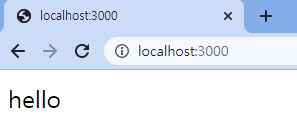
http://localhost:3000/


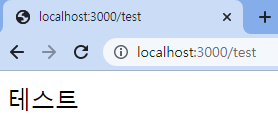
http://localhost:3000/test


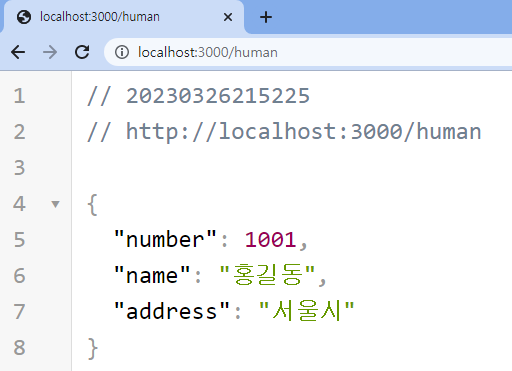
HumanDto 객체를 보내준 결과는 json 형태로 나타나는데, 위와 같이 깔끔하게 보기 위해서는 "JSON VIEWER"를 크롬에 추가했다.
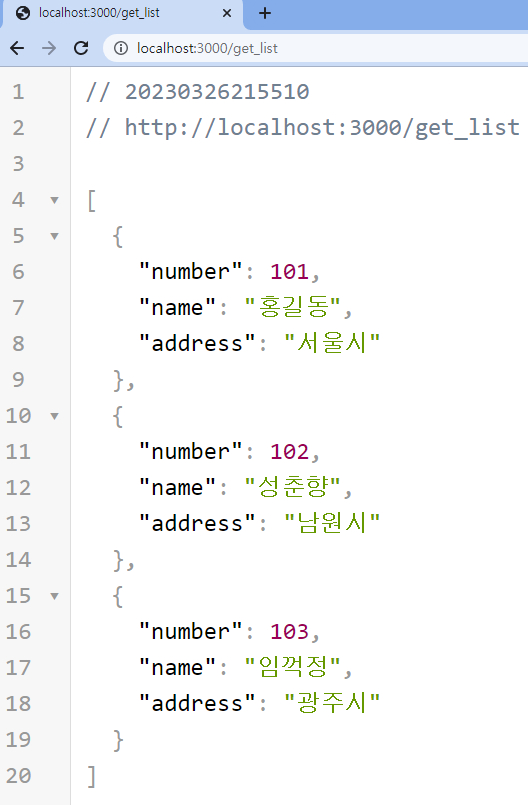


console에도 아래와 같이 "제목입니다"라는 값을 받았음을 알 수 있다.



console에도 아래와 같이 값들을 받았음을 알 수 있다.


Theme. front-end 부분 만들어서 실행 및 결과 확인


eclipse를 이용하여 html 파일들을 만들어 진행하도록 한다. ajax를 활용했다.

1. index.html


1
2
3
4
5
6
7
8
9
10
11
12
13
14
15
16
17
18
19
20
21
22
23
24
25
26
27
28
29
30
31
32
33
34
35
36
37
38
39
40
41
42
43
44
45
46
47
48
49
50
51
52
53
54
55
56
57
58
59
60
61
62
63
64
65
66
67
68
69
70
71
72
73
74
75
76
77
78
79
80
81
82
83
84
85
86
87
88
89
90
91
92
93
94
95
96
97
98
99
100
101
102
103
104
105
106
107
108
109
110
111
112
113
114
115
116
117
118
119
120
121
122
123
124
125
126
<!DOCTYPE html>
<html>
<head>
<meta charset="UTF-8">
<title>Insert title here</title>
<script src="https://ajax.googleapis.com/ajax/libs/jquery/3.6.3/jquery.min.js"></script>
</head>
<body>
 
<p id="demo"></p>
 
<button type="button" id="btn">hello</button>
 
<script type="text/javascript">
$(document).ready(function(){
    
    $("#btn").click(function(){
        
        $.ajax({
            url:"http://localhost:3000/test",
            type:"get",
            success:function(str){
//                 alert('success');
                $("#demo").text(str); // 서버(Spring Boot)에서 넘겨받은 str의 값이 p태그 안에 들어오게 됨
            
            },
            error:function(){
                alert('error');
            }
        });
        
    });
});
</script>
 
<br><br>
 
번호:<h3 id="num"></h3>
이름:<h3 id="name"></h3>
주소:<h3 id="address"></h3>
 
<button type="button" id="human">human</button>
 
<script type="text/javascript">
$("#human").click(function(){
    
    $.ajax({
        url:"http://localhost:3000/human",
        type:"get",
        success:function(obj){
            // alert('success');
            // alert(JSON.stringify(obj));
            $("#num").text(obj.number); // json이므로!
            $("#name").text(obj.name);
            $("#address").text(obj.address);
        },
        error:function(){
            alert('error');
        }        
    });
    
});
</script>
 
<br><br>
 
<h3 id="param"></h3>
 
<button type="button" id="paramBtn">conn param</button>
 
<script type="text/javascript">
$("#paramBtn").click(function(){
    
    $.ajax({
        url:"http://localhost:3000/conn_param",
        type:"get",
        data:{ "title":"제목입니다" }, // server로 보내는 data
        success:function(str){
            $("#param").text(str);
        },
        error:function(){
            alert('error');
        }
    })
    
});
</script>
 
<br><br>
 
번호:<h3 id="num1"></h3>
이름:<h3 id="name1"></h3>
주소:<h3 id="address1"></h3>
 
<button type="button" id="list">list</button>
 
<script type="text/javascript">
$("#list").click(function(){
    
    $.ajax({
        url:"http://localhost:3000/get_list",
        type:"get",
        success:function(obj){
//             alert('success');
//             alert(JSON.stringify(obj));
            $("#num1").text(obj[1].number); // 102
            $("#name1").text(obj[1].name); // 성춘향
            $("#address1").text(obj[1].address); // 남원시
        },
        error:function(){
            alert('error');
        }        
    });
    
});
</script>
 
 
</body>
</html>


cs


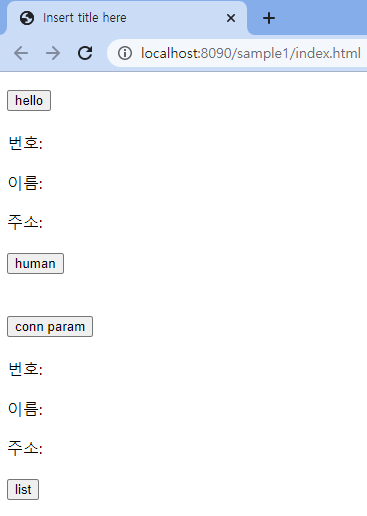
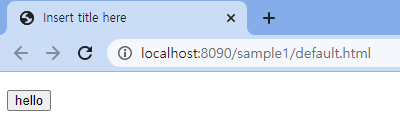
index.html의 실행 결과는 다음과 같다.


각 버튼을 누르게 되면,


STS에서 console 결과를 확인해보면, 중간에 서버로 값을 넘겨준 것이 확인된다. ("제목입니다" 보내준 부분)


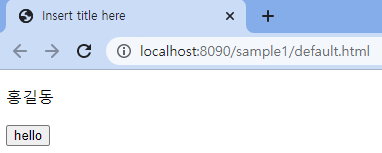
만약, ajax를 활용하지 않고 사용한다면,


2. default.html


1
2
3
4
5
6
7
8
9
10
11
12
13
14
15
16
17
18
19
20
21
22
23
24
25
26
27
28
29
30
31
32
33
34
35
36
<!DOCTYPE html>
<html>
<head>
<meta charset="UTF-8">
<title>Insert title here</title>
</head>
<body>
 
<p id="demo"></p>
 
<button type="button" onclick="btnclick()">hello</button>
 
<script type="text/javascript">
function btnclick(){
    
    let xhttp = new XMLHttpRequest();
    
    xhttp.onreadystatechange = function(){
        if(xhttp.readyState == 4 && xhttp.status == 200){
//             document.getElementById("demo").innerText = xhttp.responseText;
 
            // xhttp.responseText는 문자열이므로 json으로 바꿔줘야 함            
            let json = JSON.parse(xhttp.responseText); // json 파싱
            document.getElementById("demo").innerText = json.name;
        }
    }
    
    xhttp.open("get""http://localhost:3000/human"true);
    xhttp.send();
}
 
</script>
 
 
</body>
</html>
cs


끝.


'Spring' 카테고리의 다른 글

[Spring Boot] DB와 연결하기  (0) 2023.03.26
[Spring Boot] File 업로드 및 다운로드  (0) 2023.03.26

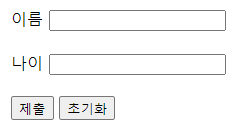
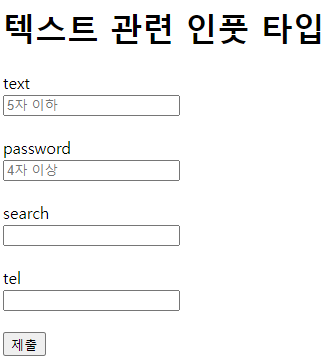
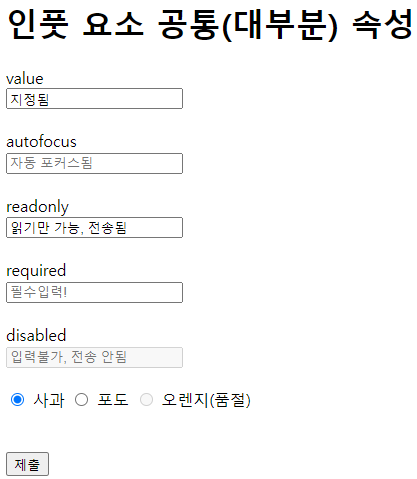
위와 같은 결과를 만들어보자. 사용된 주요 태그와 속성은 다음과 같다.

태그 설명 비고
<form> 정보를 제출하기 위한 태그들을 포함 autocomplete 속성: 자동완성 여부(기본: on)
<input> 입력을 받는 요소 type 속성을 통해 다양화
<label> input 요소마다의 라벨 for 속성값을 id와 연결. 인풋의 클릭 영역 확장
<button> 버튼 type 속성에 submit(제출), reset(초기화), button(기본 동작 없음)


1
2
3
4
5
6
7
8
9
10
11
12
13
14
15
16
17
18
19
20
21
22
23
24
25
26
27
28
 
<!DOCTYPE html>
<html lang="ko">
<head>
  <meta charset="UTF-8">
  <meta http-equiv="X-UA-Compatible" content="IE=edge">
  <meta name="viewport" content="width=device-width, initial-scale=1.0">
  <title>HTML & CSS 01-08-01</title>
</head>
<body>
 
  <form></form>
    <label for="name">이름</label>
    <input id="name" name="my-name" type="text">
 
    <br><br>
 
    <label for="age">나이</label>
    <input id="age" name="my-age" type="number">
 
    <br><br>
 
    <button type="submit">제출</button>
    <button type="reset">초기화</button>
  </form>
  
</body>
</html>
cs


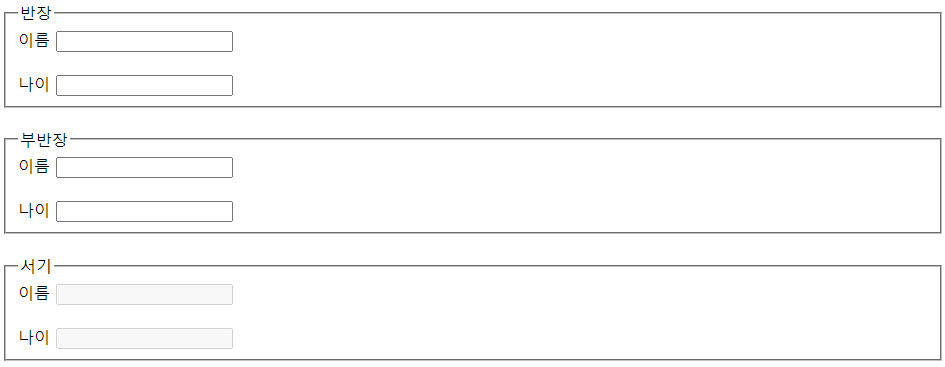
<form 안의 요소들을 그룹으로 묶기>

태그 설명 비고
<fieldset> 폼 태그 내 입력요소와 라벨들을 그룹화 disabled 속성: 포함된 입력요소 비활성화
<legend> 필드셋 요소의 제목 또는 설명  


1
2
3
4
5
6
7
8
9
10
11
12
13
14
15
16
17
18
19
20
21
22
23
24
25
26
27
28
29
30
31
32
33
34
35
36
37
38
39
40
41
42
43
44
45
46
47
48
49
50
51
 
<!DOCTYPE html>
<html lang="ko">
<head>
  <meta charset="UTF-8">
  <meta http-equiv="X-UA-Compatible" content="IE=edge">
  <meta name="viewport" content="width=device-width, initial-scale=1.0">
  <title>HTML & CSS 01-08-01</title>
</head>
<body>
  <form>
    <fieldset>
      <legend>반장</legend>
 
      <label for="name">이름</label>
      <input id="name_1" name="name_1" type="text">
      <br><br>
 
      <label for="age">나이</label>
      <input id="age_1" name="age_1" type="number">
 
    </fieldset>
    <br>
 
    <fieldset>
      <legend>부반장</legend>
 
      <label for="name">이름</label>
      <input id="name_2" name="name_2" type="text">
      <br><br>
 
      <label for="age">나이</label>
      <input id="age_2" name="age_2" type="number">
 
    </fieldset>
    <br>
 
    <fieldset form="classForm" disabled>
      <legend>서기</legend>
 
      <label for="name">이름</label>
      <input id="name_3" name="name_3" type="text">
      <br><br>
 
      <label for="age">나이</label>
      <input id="age_3" name="age_3" type="number">
    </fieldset>
  </form>
 
</body>
</html>
cs


Theme. 텍스트 관련 인풋 타입


1
2
3
4
5
6
7
8
9
10
11
12
13
14
15
16
17
18
19
20
21
22
23
24
25
26
27
28
29
30
31
32
33
34
35
36
37
38
39
40
41
42
43
44
45
 
<!DOCTYPE html>
<html lang="ko">
<head>
  <meta charset="UTF-8">
  <meta http-equiv="X-UA-Compatible" content="IE=edge">
  <meta name="viewport" content="width=device-width, initial-scale=1.0">
  <title>HTML & CSS 01-08-01</title>
</head>
<body>
   
  <h1>텍스트 관련 인풋 타입</h1>
 
  <form action="#">
    <label for="txtIp">text</label> <br>
    <input 
      id="txtIp"
      type="text"
      placeholder="5자 이하"
      maxlength="5"
    >
    <br><br>
 
    <label for="pwdIp">password</label> <br>
    <input
      id="pwdIp"
      type="password"
      placeholder="4자 이상"
      minlength="4"
    >
    <br><br>
 
    <label for="srchIp">search</label> <br>
    <input id="srchIp" type="search">
    <br><br>
 
    <label for="tlIp">tel</label> <br>
    <input id="tlIp" type="tel">
    <br><br>
    <button type="submit">제출</button>
  </form>
 
 
</body>
</html>
cs

< 텍스트 관련 인풋 속성들 >

속성 설명 비고
placeholder 빈 칸에 보이는 안내문  
maxlength 최대 길이  
minlength 최소 길이 위반 시 submit이 거부 됨


Theme. 숫자 관련 인풋 타입

1
2
3
4
5
6
7
8
9
10
11
12
13
14
15
16
17
18
19
20
21
22
23
24
25
26
27
28
29
30
31
32
33
34
35
36
37
38
39
40
41
42
43
44
45
 
<!DOCTYPE html>
<html lang="ko">
<head>
  <meta charset="UTF-8">
  <meta http-equiv="X-UA-Compatible" content="IE=edge">
  <meta name="viewport" content="width=device-width, initial-scale=1.0">
  <title>HTML & CSS 01-08-01</title>
</head>
<body>
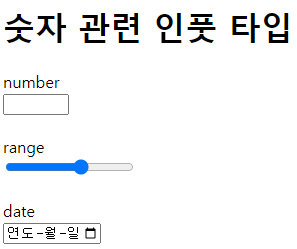
  <h1>숫자 관련 인풋 타입</h1>
 
  <form action="#">
    <label for="numIp">number</label> <br>
    <input 
      id="numIp"
      type="number"
      min="0"
      max="10"
    >
    <br><br>
 
    <label for="rgIp">range</label> <br>
    <input
      id="rgIp"
      type="range"
      min="0"
      max="100"
      step="20"
    >
    <br><br>
 
    <label for="dtIp">date</label> <br>
    <input
      id="dtIp"
      type="date"
      min="2020-01-01"
      max="2030-12-31"
    >
    <br><br>
 
  </form>
 
</body>
</html>
cs

< 숫자 관련 인풋 속성들 >

속성 설명 비고
min 최솟값 date 등 타입마다 형식 다름
max 최댓값 date 등 타입마다 형식 다름
step 간격  

Theme. 체크 관련 인풋 타입

1
2
3
4
5
6
7
8
9
10
11
12
13
14
15
16
17
18
19
20
21
22
23
24
25
26
27
28
29
30
31
32
33
34
35
36
37
38
39
40
41
42
43
44
45
46
47
48
49
50
51
52
53
54
55
56
57
58
59
60
61
62
63
64
65
66
67
68
69
70
71
72
73
 
<!DOCTYPE html>
<html lang="ko">
<head>
  <meta charset="UTF-8">
  <meta http-equiv="X-UA-Compatible" content="IE=edge">
  <meta name="viewport" content="width=device-width, initial-scale=1.0">
  <title>HTML & CSS 01-08-01</title>
</head>
<body>
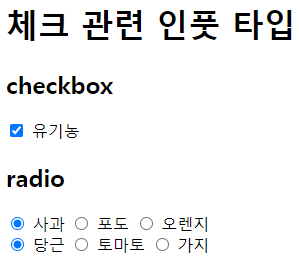
  <h1>체크 관련 인풋 타입</h1>
 
  <form action="#">
    <h2>checkbox</h2>
    <input 
      id="cbIp"
      type="checkbox"
      checked
    >
    <label for="cbIp">유기농</label> <br>
 
    <h2>radio</h2>
    <input
      type="radio"
      name="fruit"
      id="f_apple"
      value="apple"
      checked
    >
    <label for="f_apple">사과</label>
    <input
      type="radio"
      name="fruit"
      id="f_grape"
      value="grape"
    >
    <label for="f_grape">포도</label>
    <input
      type="radio"
      name="fruit"
      id="f_orange"
      value="orange"
    >
    <label for="f_orange">오렌지</label>
    <br>
 
    <input
      type="radio"
      name="vege"
      id="v_carrot"
      value="carrot"
      checked
    >
    <label for="v_carrot">당근</label>
    <input
      type="radio"
      name="vege"
      id="v_tomato"
      value="tomato"
    >
    <label for="v_tomato">토마토</label>
    <input
      type="radio"
      name="vege"
      id="v_eggplant"
      value="eggplant"
    >
    <label for="v_eggplant">가지</label>
 
  </form>
 
</body>
</html>
cs


< 체크 관련 인풋 속성들 >

속성 타입 설명
checked 체크박스 & 라디오 체크됨 여
name 라디오(다른 타입들에서도 사용된다) 옵션들의 그룹으로 사용됨
value 라디오(다른 타입들에서도 사용된다) 각 옵션마다 실제로 넘겨질 값


Theme. 기타 인풋 타입

1
2
3
4
5
6
7
8
9
10
11
12
13
14
15
16
17
18
19
20
21
22
23
24
25
26
27
28
29
30
31
32
33
34
35
36
37
38
39
40
41
42
43
44
 
<!DOCTYPE html>
<html lang="ko">
<head>
  <meta charset="UTF-8">
  <meta http-equiv="X-UA-Compatible" content="IE=edge">
  <meta name="viewport" content="width=device-width, initial-scale=1.0">
  <title>HTML & CSS 01-08-01</title>
</head>
<body>
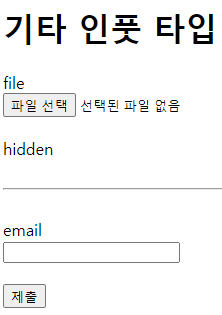
  <h1>기타 인풋 타입</h1>
 
  <form action="#">
    <label for="fileIp">file</label> <br>
    <input 
      id="fileIp"
      type="file"
      accept="image/png, image/jpeg"
      multiple
    >
    <br><br>
 
    <label for="hdnIp">hidden</label> <br>
    <input
      id="hdnIp"
      type="hidden"
    >
  </form>
 
  <br><hr><br>
 
  <form action="#">
    <label for="emlIp">email</label> <br>
    <input 
      id="emlIp"
      type="email"
    >
    <br><br>
 
    <button type="submit">제출</button>
  </form>
 
</body>
</html>
cs


< 파일 인풋 속성들 >

속성 설명
accept 받아들일 수 있는 파일 형식
multiple 여러 파일 업로드 가능 여부

1
2
3
4
5
6
7
8
9
10
11
12
13
14
15
16
17
18
19
20
21
22
23
24
25
26
27
28
29
30
31
32
33
34
35
36
37
38
39
40
41
42
43
44
45
46
47
48
49
50
51
52
53
54
55
56
57
58
59
60
61
62
63
64
65
66
67
68
69
70
71
72
73
74
75
76
77
78
79
80
81
82
83
84
85
86
87
88
 
<!DOCTYPE html>
<html lang="ko">
<head>
  <meta charset="UTF-8">
  <meta http-equiv="X-UA-Compatible" content="IE=edge">
  <meta name="viewport" content="width=device-width, initial-scale=1.0">
  <title>HTML & CSS 01-08-01</title>
</head>
<body>
   
  <h1>인풋 요소 공통(대부분) 속성</h1>
 
  <form action="#">
    <label for="valIp">value</label> <br>
    <input 
      id="valIp"
      type="text"
      value="지정됨"
    >
    <br><br>
 
    <label for="afIp">autofocus</label> <br>
    <input 
      id="afIp"
      type="text"
      placeholder="자동 포커스됨"
      autofocus
    >
    <br><br>
 
    <label for="roIp">readonly</label> <br>
    <input 
      id="roIp"
      type="text"
      value="읽기만 가능, 전송됨"
      readonly
    >
    <br><br>
 
    <label for="rqIp">required</label> <br>
    <input 
      id="rqIp"
      type="text"
      placeholder="필수입력!"
      required
    >
    <br><br>
 
    <label for="daIp">disabled</label> <br>
    <input 
      id="daIp"
      type="text"
      placeholder="입력불가, 전송 안됨"
      disabled
    >
    <br><br>
    <input
      type="radio"
      name="fruit"
      id="f_apple"
      value="apple"
      checked
    >
    <label for="f_apple">사과</label>
    <input
      type="radio"
      name="fruit"
      id="f_grape"
      value="grape"
    >
    <label for="f_grape">포도</label>
    <input
      type="radio"
      name="fruit"
      id="f_orange"
      value="orange"
      disabled
    >
    <label for="f_orange">오렌지(품절)</label>
    <br>
 
    <br><br>
 
    <button type="submit">제출</button>
  </form>
</body>
</html>
cs

Theme.textarea 태그

1
2
3
4
5
6
7
8
9
10
11
12
13
14
15
16
17
 
<!DOCTYPE html>
<html lang="ko">
<head>
  <meta charset="UTF-8">
  <meta http-equiv="X-UA-Compatible" content="IE=edge">
  <meta name="viewport" content="width=device-width, initial-scale=1.0">
  <title>HTML & CSS 01-08-01</title>
</head>
<body>
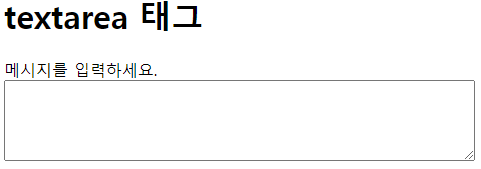
    <h1>textarea 태그</h1>
 
  <label for="message">메시지를 입력하세요.</label> <br>
  <textarea id="message" cols="64" rows="5"></textarea>
 
</body>
</html>
cs

< textarea 전용 속성들 >

속성 설명 비고
cols 글자수 단위의 너비 기본값 20
rows 표시되는 줄 수  

cf) <textarea>는 기본값을 value 속성이 아닌 컨텐츠로 입력


Theme. 옵션들을 사용하는 태그

1
2
3
4
5
6
7
8
9
10
11
12
13
14
15
16
17
18
19
20
21
22
23
24
25
26
27
28
29
30
31
32
33
34
35
36
37
38
39
40
41
42
43
44
45
46
47
48
49
50
51
52
53
54
55
56
57
58
59
60
61
 
<!DOCTYPE html>
<html lang="ko">
<head>
  <meta charset="UTF-8">
  <meta http-equiv="X-UA-Compatible" content="IE=edge">
  <meta name="viewport" content="width=device-width, initial-scale=1.0">
  <title>HTML & CSS 01-08-01</title>
</head>
<body>
  <h1>옵션들을 사용하는 태그</h1>
 
  <h2>select, option 태그</h2>
 
  <label for="lang">언어</label> <br>
  <select id="lang">
    <option value="">-- 언어 선택 --</option>
    <option value="html">HTML</option>
    <option value="css">CSS</option>
    <option value="js">자바스크립트</option>
    <option value="ts">타입스크립트</option>
  </select>
 
  <br><br>
 
  <h2>optgroup 태그</h2>
 
  <label for="shopping">쇼핑 목록</label> <br>
  <select id="shopping">
    <optgroup label="과일">
      <option value="f_apl">사과</option>
      <option value="f_grp">포도</option>
      <option value="f_org">오렌지</option>
    </optgroup>
    <optgroup label="채소">
      <option value="v_crt">당근</option>
      <option value="v_tmt">토마토</option>
      <option value="v_ept">가지</option>
    </optgroup>
    <optgroup label="육류">
      <option value="m_bef">소고기</option>
      <option value="m_prk">돼지고기</option>
      <option value="m_ckn">닭고기</option>
    </optgroup>
  </select>
 
  <br><br>
 
  <h2>datalist 태그</h2>
 
  <label for="job">현재 직업</label> <br>
  <input id="job" list="jobs">
  <datalist id="jobs">
    <option value="학생">
    <option value="디자이너">
    <option value="퍼블리셔">
    <option value="개발자">
  </datalist>
 
</body>
</html>
cs


출처: 얄팍한 코딩사전 유튜브 및 https://www.yalco.kr/


얄코 홈

어려운 프로그래밍 개념들을 쉽게 설명해주는 유튜브 채널 '얄팍한 코딩사전'. 영상에서 다 알려주지 못한 정보들이나 자주 묻는 질문들의 답변들, 예제 코드들을 얄코에서 확인하세요!

www.yalco.kr


'HTML, CSS' 카테고리의 다른 글

HTML 기본 정리(1)  (0) 2023.01.29
CSS 기초  (0) 2023.01.27
HTML 기초  (0) 2023.01.26
WEB - HTML & Internet  (0) 2023.01.25

Theme. 제목 및 본문 태그(tag)

태그 or 구문 설명 비고
<h1> ~ <h6> 제목 숫자가 낮을수록 높은 단계
<p> 문단 문단별 줄바꿈이 됨
<br> 줄바꿈(개행) 닫는 태그 필요 없음
<hr> 가로줄 닫는 태그 필요 없음
&nbsp; 공백(스페이스) 스페이스 강제

cf) 주석 처리는 <!-- 주석 처리 -->


Theme. 종류와 중요도에 따른 태그

HTML 태그는 정보의 종류를 구분하는 데에만 사용된다. 디자인(스타일) 정보는 CSS로 분리되었다.

1. strong 태그와 b 태그

<b>: 글자를 굵게

<strong>: 글자를 굵게 + 태그로 감싼 부분이 중요하다는 의미를 내포


2. i 태그와 em 태그

<i>: 글자를 기울임

<em>: 글자를 기울임 + 강조할 내용임을 명시


3. 첨자 태그

<sup>: 위 첨자(지수나 서수에 사용)

<sub>: 아래 첨자(각주, 변수, 화학식에 사용)


4. 밑줄 및 취소선 태그

<u>: 이전에는 밑줄을 긋는 용도로 사용됐으나 현재는 철자 오류 등을 강조하는 용도로 사용된다.

<s>: 더 이상 유효하지 않는 정보를 취소선과 함께 나타냄


Theme. 인용된 콘텐츠

cf) <,> 입력하기(태그로 인식하지 않도록): &lt;(<), &gt;(>)


< 인용문 관련 태그 >

태그 설명 비고
<blockquote> 비교적 긴 인용문에 사용 cite 속성으로 출처 표시
<cite> 저작물의 출처 표기 제목을 반드시 포함
<q> 비교적 짧은 인용문에 사용 cite 속성으로 출처 표시
<mark> 인용문 중 하이라이트 또는 사용자 행동과 연관된 곳 표시  


1
2
3
4
5
6
7
8
9
10
11
12
13
14
15
16
17
18
19
20
21
22
23
24
25
26
27
28
29
30
31
32
33
34
35
36
37
38
39
40
41
42
43
44
45
46
47
48
49
50
51
52
53
54
 
<!DOCTYPE html>
<html lang="ko">
<head>
  <meta charset="UTF-8">
  <meta http-equiv="X-UA-Compatible" content="IE=edge">
  <meta name="viewport" content="width=device-width, initial-scale=1.0">
  <link rel="stylesheet" href="../pretty.css">
  <style>
    i { 
      color: lightseagreen;
      font-style: normal;
      font-weight: bold;
      font-size: 0.9em;
    }
  </style>
  <title>HTML & CSS 01-03-02</title>
</head>
<body>
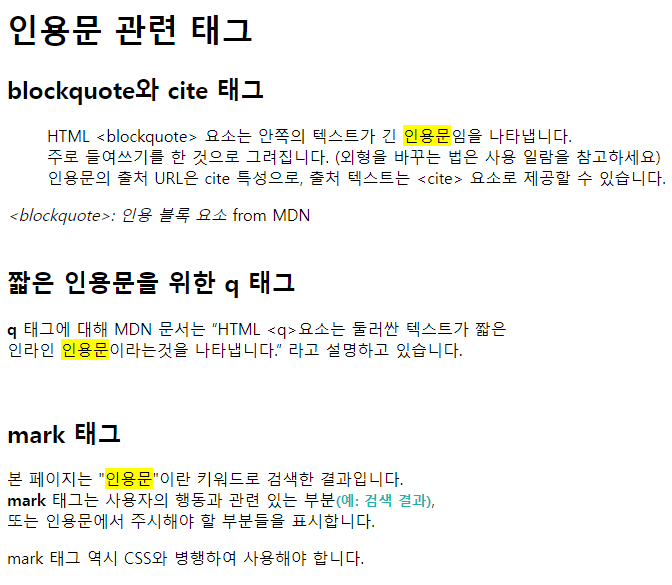
  <h1>인용문 관련 태그</h1>
  <h2>blockquote와 cite 태그</h2>
  <blockquote cite="https://developer.mozilla.org/ko/docs/Web/HTML/Element/blockquote">
    <p>
      HTML &lt;blockquote&gt; 요소는 안쪽의 텍스트가 긴 <mark>인용문</mark>임을 나타냅니다. <br>
      주로 들여쓰기를 한 것으로 그려집니다. (외형을 바꾸는 법은 사용 일람을 참고하세요) <br>
      인용문의 출처 URL은 cite 특성으로, 출처 텍스트는 &lt;cite&gt; 요소로 제공할 수 있습니다.
    </p>
  </blockquote>
  <cite>&lt;blockquote&gt;: 인용 블록 요소</cite> from MDN
 
  <br><br>
 
  <h2>짧은 인용문을 위한 q 태그</h2>
  <p>
    <strong>q</strong> 태그에 대해 MDN 문서는
    <q cite="https://developer.mozilla.org/ko/docs/Web/HTML/Element/q"
    >HTML &lt;q&gt;요소는 둘러싼 텍스트가 짧은 <br> 인라인 <mark>인용문</mark>이라는것을 나타냅니다.</q>
    라고 설명하고 있습니다.
  </p>
 
  <br>
 
  <h2>mark 태그</h2>
  <p>
    본 페이지는 "<mark>인용문</mark>"이란 키워드로 검색한 결과입니다. <br>
    <strong>mark</strong> 태그는 사용자의 행동과 관련 있는 부분<i>(예: 검색 결과)</i><br>
    또는 인용문에서 주시해야 할 부분들을 표시합니다.
  </p>
  <p>
    mark 태그 역시 CSS와 병행하여 사용해야 합니다.
  </p>
  
</body>
</html>
cs

<abbr>: 준말/머릿글자 표시(title 속성으로 원래 형태 표시)

1
2
3
4
5
6
7
8
9
10
11
12
13
14
15
16
17
18
19
20
21
 
<!DOCTYPE html>
<html lang="ko">
<head>
  <meta charset="UTF-8">
  <meta http-equiv="X-UA-Compatible" content="IE=edge">
  <meta name="viewport" content="width=device-width, initial-scale=1.0">
  <link rel="stylesheet" href="../pretty.css">
  <title>HTML & CSS 01-03-03</title>
</head>
<body>
 
  <h1>abbr 태그로 머리글자 표현하기</h1>
  <p>
    <strong>abbr</strong> 태그를 사용하여
    <abbr title="HyperText Markup Language">HTML</abbr>
    을 표기한 문단입니다. 소스 보기로 코드를 확인해보세요!
  </p>
  
</body>
</html>
cs

Theme. 나열되는 요소들

<목록을 표현하는 태그들>

태그 설명 비고
<ul> (unordered list) 순서가 없는 목록  
<ol> (ordered list) 순서가 있는 목록 type, start 속성 사용 가능
<li> (list) 목록 아이템 ul,ol 태그의 1촌 자식으로 이 태그만 가능


1
2
3
4
5
6
7
8
9
10
11
12
13
14
15
16
17
18
19
20
21
22
23
24
25
26
27
28
 
<!DOCTYPE html>
<html lang="ko">
<head>
  <meta charset="UTF-8">
  <meta http-equiv="X-UA-Compatible" content="IE=edge">
  <meta name="viewport" content="width=device-width, initial-scale=1.0">
  <link rel="stylesheet" href="../pretty.css">
  <title>HTML & CSS 01-04-02</title>
</head>
<body>
 
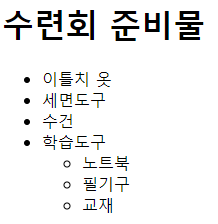
  <h1>수련회 준비물</h1>
  <ul>
    <li>이틀치 옷</li>
    <li>세면도구</li>
    <li>수건</li>
    <li>학습도구
      <ul>
        <li>노트북</li>
        <li>필기구</li>
        <li>교재</li>
      </ul>
    </li>
  </ul>
 
</body>
</html>
cs

1
2
3
4
5
6
7
8
9
10
11
12
13
14
15
16
17
18
19
20
21
22
23
24
25
26
27
28
29
30
31
32
 
<!DOCTYPE html>
<html lang="ko">
<head>
  <meta charset="UTF-8">
 
  <title>HTML & CSS 01-04-03</title>
</head>
<body>
 
  <main>
    <section class="result">
 
      <h1>계란볶음밥 만들기</h1>
      <ol type="1" start="0">
        <li>재료 준비
          <ul>
            <li></li>
            <li>계란</li>
            <li></li>
            <li>간장</li>
          </ul>
        </li>
        <li>파를 기름에 볶기</li>
        <li>밥 넣고 볶기</li>
        <li>계란을 넣고 스크램블</li>
        <li>간장을 넣고 마저 볶아 완성</li>
      </ol>
 
 
</body>
</html>
cs


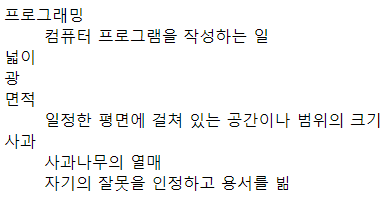
<용어의 정의 나열하기>


1
2
3
4
5
6
7
8
9
10
11
12
13
14
15
16
17
18
19
20
21
22
23
24
25
26
27
28
29
 
<!DOCTYPE html>
<html lang="ko">
<head>
  <meta charset="UTF-8">
  <meta http-equiv="X-UA-Compatible" content="IE=edge">
  <meta name="viewport" content="width=device-width, initial-scale=1.0">
  <title>HTML & CSS 01-04-05</title>
</head>
<body>
 
  <dl>
    
    <dt>프로그래밍</dt>
    <dd>컴퓨터 프로그램을 작성하는 일</dd>
 
    <dt>넓이</dt>
    <dt></dt>
    <dt>면적</dt>
    <dd>일정한 평면에 걸쳐 있는 공간이나 범위의 크기</dd>
 
    <dt>사과</dt>
    <dd>사과나무의 열매</dd>
    <dd>자기의 잘못을 인정하고 용서를 빎</dd>
 
  </dl>
  
</body>
</html>
cs


Theme. 이미지 넣기

먼저, 형식은 다음과 같다.

<img src="(이미지 파일 경로)" alt="(대체 텍스트)" title="(툴팁 텍스트)">

속성 설명 비고
src 원본파일 경로 절대경로 또는 상대경로
alt 대체 텍스트 스크린 리더, 원본파일 무효
title 툴팁 alt의 대체제나 반복이 되어서는 안됨
width 너비 픽셀 단위의 정수
height 높이 픽셀 단위의 정수

절대 경로: 경로(주소 등)를 자세히 모두 적는 것

상대 경로: ./ 사용(같은 폴더에 있는 경우), ../ 사용(다른 폴더에 있는 경우)


Theme. 표 사용하기

태그 설명 비고
<table> 테이블  
<caption> 표 설명 또는 제목 선택 사항
<tr> 테이블의 행  
<td> 테이블의 데이터 셀  


1
2
3
4
5
6
7
8
9
10
11
12
13
14
15
16
17
18
19
20
21
22
23
24
25
26
27
28
29
30
31
32
33
 
<!DOCTYPE html>
<html lang="ko">
<head>
  <meta charset="UTF-8">
  <meta http-equiv="X-UA-Compatible" content="IE=edge">
  <meta name="viewport" content="width=device-width, initial-scale=1.0">
  <link rel="stylesheet" href="https://showcases.yalco.kr/html-css/01-06/table.css">
  <title>HTML & CSS 01-06-02</title>
</head>
<body>
 
  <table>
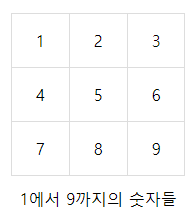
    <caption>1에서 9까지의 숫자들</caption>
    <tr>
      <td>1</td>
      <td>2</td>
      <td>3</td>
    </tr>
    <tr>
      <td>4</td>
      <td>5</td>
      <td>6</td>
    </tr>
    <tr>
      <td>7</td>
      <td>8</td>
      <td>9</td>
    </tr>
  </table>
  
</body>
</html>
cs

태그 설명 비고
<thead> 테이블의 헤더 부분 <tbody>앞에 와야 함
<tbody> 테이블의 본문 본 내용을 담음
<tfoot> 테이블의 푸터 부분 <tbody> 뒤에 와야 함
<th> 열 또는 행의 헤더 scope 속성으로 row, col 중 선택


1
2
3
4
5
6
7
8
9
10
11
12
13
14
15
16
17
18
19
20
21
22
23
24
25
26
27
28
29
30
31
32
33
34
35
36
37
38
39
40
41
42
43
44
45
46
47
48
49
50
51
52
53
 
<!DOCTYPE html>
<html lang="ko">
<head>
  <meta charset="UTF-8">
  <meta http-equiv="X-UA-Compatible" content="IE=edge">
  <meta name="viewport" content="width=device-width, initial-scale=1.0">
  <link rel="stylesheet" href="https://showcases.yalco.kr/html-css/01-06/table.css">
  <title>HTML & CSS 01-06-02</title>
</head>
<body>
  <table>
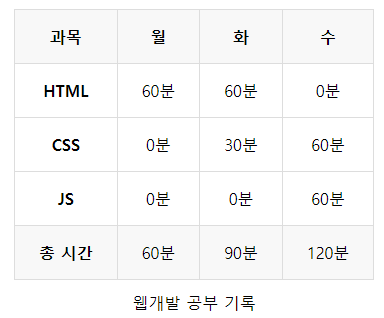
        <caption>웹개발 공부 기록</caption>
        <thead>
            <tr>
                <th scope="col">과목</th>
                <th scope="col"></th>
                <th scope="col"></th>
                <th scope="col"></th>
            </tr>
        </thead>
        <tbody>
            <tr>
                <th scope="row">HTML</th>
                <td>60분</td>
                <td>60분</td>
                <td>0분</td>
            </tr>
            <tr>
                <th scope="row">CSS</th>
                <td>0분</td>
                <td>30분</td>
                <td>60분</td>
            </tr>
            <tr>
                <th scope="row">JS</th>
                <td>0분</td>
                <td>0분</td>
                <td>60분</td>
            </tr>
        </tbody>
        <tfoot>
            <tr>
                <th scope="row">총 시간</th>
                <td>60분</td>
                <td>90분</td>
                <td>120분</td>
            </tr>
        </tfoot>
    </table>
  
</body>
</html>
cs


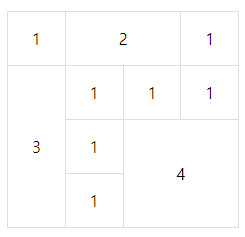
추가적으로 속성으로써,

colspan: 열 병합, rowspan: 행 병합 을 사용할 수 있다.


1
2
3
4
5
6
7
8
9
10
11
12
13
14
15
16
17
18
19
20
21
22
23
24
25
26
27
28
29
30
31
32
33
34
35
 
<!DOCTYPE html>
<html lang="ko">
<head>
  <meta charset="UTF-8">
  <meta http-equiv="X-UA-Compatible" content="IE=edge">
  <meta name="viewport" content="width=device-width, initial-scale=1.0">
  <link rel="stylesheet" href="https://showcases.yalco.kr/html-css/01-06/table.css">
  <title>HTML & CSS 01-06-02</title>
</head>
<body>
  <table>
        <tr>
            <td>1</td>
            <td colspan="2">2</td>
            <td>1</td>
        </tr>
        <tr>
            <td rowspan="3">3</td>
            <td>1</td>
            <td>1</td>
            <td>1</td>
        </tr>
        <tr>
            <td>1</td>
            <td colspan="2" rowspan="2">4</td>
        </tr>
        <tr>
            <td>1</td>
        </tr>
    </table>
 
  
</body>
</html>
cs
태그 설명 비고
<colgroup> 표에 열을 묶어서 속성 부여 <caption>보다 뒤, 그 외 요소보다 앞에 와야 함
<col> 열의 묶음 span 속성으로 열 수 지정


1
2
3
4
5
6
7
8
9
10
11
12
13
14
15
16
17
18
19
20
21
22
23
24
25
26
27
28
29
30
31
32
33
34
35
36
37
38
39
40
41
42
43
44
45
46
47
48
49
50
51
52
53
54
55
56
57
58
59
60
61
62
63
64
65
66
67
68
69
70
71
 
<!DOCTYPE html>
<html lang="ko">
<head>
  <meta charset="UTF-8">
  <meta http-equiv="X-UA-Compatible" content="IE=edge">
  <meta name="viewport" content="width=device-width, initial-scale=1.0">
  <link rel="stylesheet" href="https://showcases.yalco.kr/html-css/01-06/table.css">
  <title>HTML & CSS 01-06-02</title>
</head>
<body>
  <table>
        <colgroup>
            <col class="weekend">
            <col span="5">
            <col class="weekend">
        </colgroup>
        <thead>
            <tr>
                <th scope="col"></th>
                <th scope="col"></th>
                <th scope="col"></th>
                <th scope="col"></th>
                <th scope="col"></th>
                <th scope="col"></th>
                <th scope="col"></th>
            </tr>
        </thead>
        <tbody>
            <tr>
                <td>_</td>
                <td>_</td>
                <td>_</td>
                <td>_</td>
                <td>_</td>
                <td>_</td>
                <td>_</td>
            </tr>
            <tr>
                <td>_</td>
                <td>_</td>
                <td>_</td>
                <td>_</td>
                <td>_</td>
                <td>_</td>
                <td>_</td>
            </tr>
            <tr>
                <td>_</td>
                <td>_</td>
                <td>_</td>
                <td>_</td>
                <td>_</td>
                <td>_</td>
                <td>_</td>
            </tr>
            <tr>
                <td>_</td>
                <td>_</td>
                <td>_</td>
                <td>_</td>
                <td>_</td>
                <td>_</td>
                <td>_</td>
            </tr>
        </tbody>
    </table>
 
  
</body>
</html>
cs


Theme. 다른 곳으로의 링크


먼저 작성된 코드를 보자

1
2
3
4
5
6
7
8
9
10
11
12
13
14
15
16
17
18
19
20
21
 
<!DOCTYPE html>
<html lang="ko">
<head>
  <meta charset="UTF-8">
  <meta http-equiv="X-UA-Compatible" content="IE=edge">
  <meta name="viewport" content="width=device-width, initial-scale=1.0">
  <title>HTML & CSS 01-07-04</title>
</head>
<body>
 
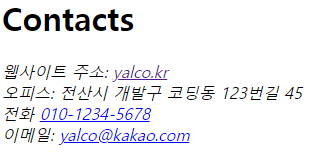
  <h1>Contacts</h1>
  <address>
    웹사이트 주소: <a href="https://www.yalco.kr">yalco.kr</a> <br>
    오피스: 전산시 개발구 코딩동 123번길 45 <br>
    전화 <a href="tel:010-1234-5678">010-1234-5678</a> <br>
    이메일: <a href="mailto:yalco@kakao.com">yalco@kakao.com</a>
  </address>
  
</body>
</html>
cs

하나씩 그 형식에 대해 살펴보면,

먼저, 링크를 위한 <a> 태그의 형식은 <a href="(연결할 주소)" target="(링크를 열 곳 옵션)"> 이다.

target 속성값 설명 비고
_self 현재 창에서 열리도록 기본값
_blank 새 창에서 열리도록 텍스트나 내부 이미지의 alt 등으로의 명시 필요

cf)

href의 값의 앞부분에 tel: 을 사용하면 전화번호에서 바로 연결되도록 할 수 있고, mailto: 를 사용하면 이메일 링크로 넘어가진다.

<address>: 주소 및 연락처 정보를 포함


출처: 얄팍한 코딩사전 유튜브와 https://www.yalco.kr/


얄코 홈

어려운 프로그래밍 개념들을 쉽게 설명해주는 유튜브 채널 '얄팍한 코딩사전'. 영상에서 다 알려주지 못한 정보들이나 자주 묻는 질문들의 답변들, 예제 코드들을 얄코에서 확인하세요!

www.yalco.kr


'HTML, CSS' 카테고리의 다른 글

HTML 기본 정리(2) - 사용자로부터 입력받기  (0) 2023.01.29
CSS 기초  (0) 2023.01.27
HTML 기초  (0) 2023.01.26
WEB - HTML & Internet  (0) 2023.01.25

Theme. 배경에 이미지 넣기

1
2
3
4
5
6
7
8
9
10
11
12
13
14
15
16
17
18
19
20
21
22
23
24
25
26
<!DOCTYPE html>
<html>
<head>
<meta charset="UTF-8">
<title>Insert title here</title>
 
<style type="text/css">
    body{
        /* background-color: red;
        background-image: url("./image.jpg");
         background-repeat: repeat-x; 
        background-repeat: no-repeat;
        background-position: right top; */
        
        background: red url("./image.jpg") no-repeat right top;
    }
 
</style>
 
 
</head>
<body>
 
 
</body>
</html>
cs

background-image: url("경로") 입력을 해 기본적으로 이미지를 가져올 수 있고, 다양한 기능들은 필요에 따라 검색하도록 한다.


Theme. 글자 형태 변경과 <a>태그에 다양한 기능 추가하기

1
2
3
4
5
6
7
8
9
10
11
12
13
14
15
16
17
18
19
20
21
22
23
24
25
26
27
28
29
30
31
32
33
34
35
36
37
38
39
40
41
42
43
44
45
46
47
48
49
50
51
52
53
54
55
56
57
58
59
60
61
62
63
64
65
66
67
<!DOCTYPE html>
<html>
<head>
<meta charset="UTF-8">
<title>Insert title here</title>
<style>
    body{
        color: green;
        text-align: center;
    }
    .upper{
        text-transform: uppercase;
    }
    .lower{
        text-transform: lowercase;
    }
    .capital{
        text-transform: capitalize;
    }
    .demo{
        font-family: "Times New Roman";
        font-style: italic;
        font-size: 2em;
        color: blue;
    }
    a{
        text-decoration: none;
    }
    a:link{
        color: #ff0000;
    }
    a:visited{
        color: #000;
    }
    a:hover{
        color: blue;
        text-decoration: underline;
    }
    a:active{
        color: white;
        background-color: blue;
    }
</style>
 
</head>
<body>
 
<h3>Title</h3>
 
<p>Hello CSS Html</p>
 
<p class="upper">Hello CSS Html</p>
<p class="lower">Hello CSS Html</p>
<p class="capital">hello CSS Html</p>
 
<pre class="demo">
Hello My World
welcome
</pre>
 
<a href="http://www.google.com">Google home page</a>
<br>
<a href="http://www.google123.com">non-visited home page</a>
 
 
</body>
</html>
cs

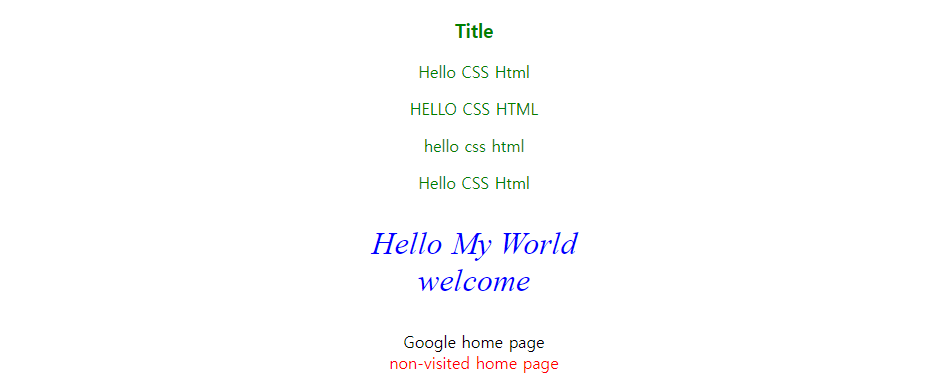
간단한 설명을 덧붙이자면,

a: link 는 방문 전 링크 상태

a: visited 는 방문 후 링크 상태

a: hover 는 마우스 포인터를 링크에 가져갔을 때, 링크 상태(클릭 X)

a: active 는 클릭했을 때 링크 상태

이고, 가능한 한 위 순서대로 적용하는 것이 바람직하다.

결과를 살펴보면


Theme. <style>태그로 감싼 부분을 별도의 CSS 파일로 저장하여 사용하기

external 방식으로 CSS를 사용하는 것이다.

왜 별도로 CSS파일을 만들고 외부로부터 그 파일을 불러와 현재 파일에서 사용하려고 할까?


가장 큰 이유는 "중복"의 제거이다.

극한의 상황을 가정해보자.

1억개의 html파일에 동일한 <style> 태그 부분이 존재한다고 하자.

이 때, 일부 효과를 수정해야 한다면, 1억개의 파일 각각에 대하여 수정을 해줘야 한다.

만약, 중복된 코드들을 별도의 장소에 저장해놓고, 이를 다양한 파일들이 가져가 사용할 수 있게하며, 필요에 따라 모든 파일들에 적용되는 코드들을 한번에 수정할 수 있다면? 굉장히 효율적일 것이다.

이를 위해, 별도의 CSS 파일을 외부에 저장해놓는 것이다.


방법은 간단하다.

<style>태그로 감싼 부분을 주석처리 해놓고 그만큼을 다른 CSS 파일에 저장해 놓은 것을 나타내고, CSS파일을 불러오는 코드를 아래 나타내보면, 

1
2
3
4
5
6
7
8
9
10
11
12
13
14
15
16
17
18
19
20
21
22
23
24
25
26
27
28
29
30
31
32
33
34
35
36
37
38
39
40
41
42
43
44
45
46
47
48
49
50
51
52
53
54
55
56
57
58
<!DOCTYPE html>
<html>
<head>
<meta charset="UTF-8">
<title>Insert title here</title>
<!-- <style>
table {
    width: 100%;
    border-collapse: collapse;
}
 
table, th, td {
    border: 1px solid black;
}
 
th {
    height: 30px;
    background-color: #00ff00;
    color: white;
}
 
td {
    padding: 10px;
}
td.center{
    text-align: center;
}
</style> -->
 
<!-- external -->
<link rel="stylesheet" href="table.css">
 
</head>
<body>
 
    <table>
        <tr>
            <th>번호</th>
            <th>이름</th>
            <th>나이</th>
        </tr>
        <tr>
            <td class="center">1</td>
            <td>홍길동</td>
            <td>24</td>
        </tr>
        <tr>
            <td class="center">2</td>
            <td>성춘향</td>
            <td>16</td>
        </tr>
 
    </table>


</body>
</html>
cs


1
2
3
4
5
6
7
8
9
10
11
12
13
14
15
16
17
18
19
20
21
22
23
24
@charset "EUC-KR";
table {
    width: 100%;
    border-collapse: collapse;
}
 
table, th, td {
    border: 1px solid black;
}
 
th {
    height: 30px;
    background-color: #00ff00;
    color: white;
}
 
td {
    padding: 10px;
}
td.center{
    text-align: center;
}
 
 
cs

첫번째는 html파일, 두번째는 CSS파일이다.

첫번째 html파일에서 <link rel="stylesheet" href="table.css"> 부분이 외부 CSS파일을 불러와 사용하는 태그이다.


Theme. 화면 분할

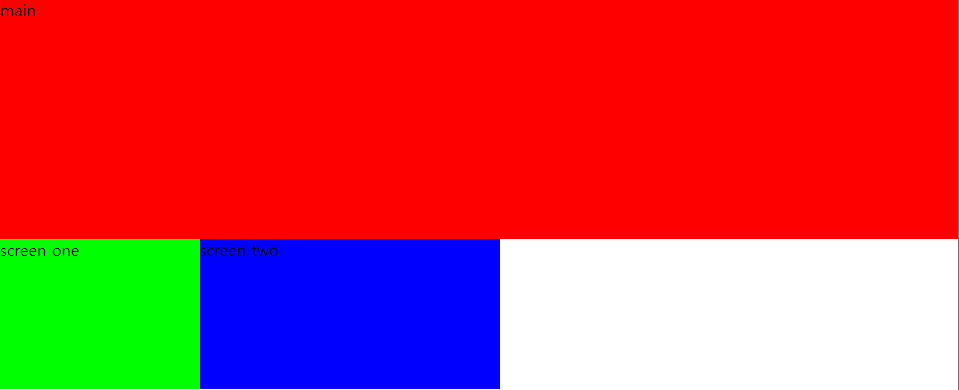
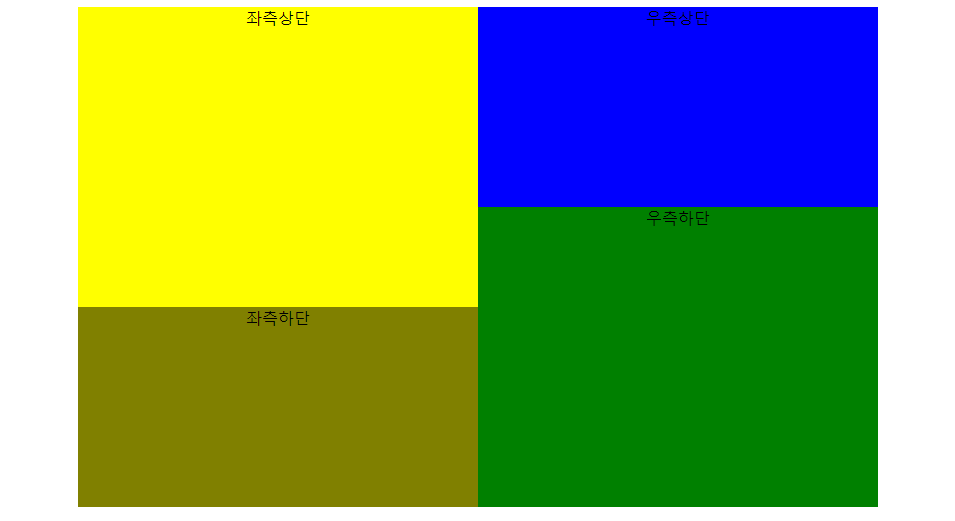
화면 분할하는 방법과 결과를 정리한다.

1
2
3
4
5
6
7
8
9
10
11
12
13
14
15
16
17
18
19
20
21
22
23
24
25
26
27
28
29
30
31
32
33
34
35
36
37
38
39
40
41
42
43
44
45
46
47
48
49
<!DOCTYPE html>
<html>
<head>
<meta charset="UTF-8">
<title>Insert title here</title>
 
<style type="text/css">
 
body{
    margin: 0;
}
#mainscr{
    width: 100%;
    height: 240px;
    background-color: #ff0000;
}
#one{
    width: 200px;
    height: 150px;
    background-color: #00ff00;
    float: left;
}
#two{
    width: 300px;
    height: 150px;
    background-color: #0000ff;
    float: left;
}
 
</style>
 
</head>
<body>
 
<div id="mainscr">
main
</div>
 
<div id="one">
screen one
</div>
 
<div id="two">
screen two
</div>
 
 
</body>
</html>
cs
1
2
3
4
5
6
7
8
9
10
11
12
13
14
15
16
17
18
19
20
21
22
23
24
25
26
27
28
29
30
31
32
33
34
35
36
37
38
39
40
41
42
43
44
45
46
47
48
49
50
51
52
53
54
55
56
57
58
59
60
61
62
63
64
65
66
67
68
<!DOCTYPE html>
<html>
<head>
<meta charset="UTF-8">
<title>Insert title here</title>
 
<style>
#fullscreen{
    width: 800px;
    height: 500px;
    background-color: gray;
}
#left{
    width: 400px;
    height: 500px;
    background-color: orange;
    float: left;
}
#leftup{
    width: 400px;
    height: 300px;
    background-color: yellow;
}
#leftdown{
    width: 400px;
    height: 200px;
    background-color: olive;
}
.right{
    width: 400px;
    height: 500px;
    background-color: red;
    float: left;
}
.rightup{
    width: 400px;
    height: 200px;
    background-color: blue;
    
}
.rightdown{
    width: 400px;
    height: 300px;
    background-color: green;
}
</style>
 
</head>
<body>
 
<div align="center">
    <div id="fullscreen">
        <div id="left">
            <div id="leftup">좌측상단</div>
            <div id="leftdown">좌측하단</div>
        </div>
            
        <div class="right">
            <div class="rightup">우측상단</div>
            <div class="rightdown">우측하단</div>
        </div>
    </div>
</div>


</body>
</html>
cs


추가로, CSS 기초적인 공부하기 좋은 사이트: https://www.yalco.kr/@html-css/2-1/


CSS 적용방법(inline, internal, linked)과 선택자들

어려운 프로그래밍 개념들을 쉽게 설명해주는 유튜브 채널 '얄팍한 코딩사전'. 영상에서 다 알려주지 못한 정보들이나 자주 묻는 질문들의 답변들, 예제 코드들을 얄코에서 확인하세요!

www.yalco.kr


Theme.HTML 기본 구조

1
2
3
4
5
6
7
8
9
10
11
12
13
<!DOCTYPE html>
<html>
 
<head>
<meta charset="UTF-8">
<title></title>
</head>
 
<body>
 
</body>
 
</html>
cs

기본적인 구조는 위와 같다. 간단하게, <body>태그로 감싸는 부분은 본문에 해당하고, <head>태그로 감싸는 부분은 본문을 설명하는 부분이라고 설명할 수 있다. 그리고 현재 <title>태그 안에 아무 것도 써있지 않지만, chrome을 통해 html 파일을 열게 되면, 탭에 나타나는 제목을 작성할 수 있다. 또한, <!doctype html>은 관용적인 표현으로 이해하면 된다.

<meta charset = "UTF-8"> 태그는 파일을 열 때 한글이 깨지는 것을 해결할 수 있다.


Theme. 주요 태그 일부(tag) 

태그들의 효과를 하나하나 나타내기 보다는 먼저 태그들의 효과를 간략하게 정리하고, 이후 종합적으로 한번에 나타내도록 한다. 태그와 그 태그의 효과만을 살펴보면,

<strong> </strong>: 진하게

<u> </u>: 밑줄긋기(underline)

<h1> ~ <h6> </h1> ~ </h6>: 제목 태그(headings)

<br>: 줄 바꾸는 태그(개행)

<p> </p>: 단락을 나타내는(구분해주는) 태그(paragraph)

<pre> </pre>: 브라우저 화면에 작성된 코드가 보이는 그대로 출력되도록 하는 태그(pre-formatted)


Theme. attribute, property

1
2
3
4
5
<h1 style="background-color: white; color: blue">Hello Html</h1>
 
<h2 style="color: red; background-color: yellow">Hello Html</h2>
 
<p style="background-color: white">문장태그입니다</p>
cs

각각의 attribute, property가 어떤 의미를 가지는지는 필요한 기능이 있을 때 그때그때 찾아서 기억하도록 하자.

형식적인 측면에서 우선, 위 코드에서 attribute에 해당하는 것은 style이다.

background-color, color는 property에 해당하고,

white, blue, red, yellow는 property value 또는 value라고 한다.


즉, 형식만을 정리하면,

<tag attribute1 = "value1" attribute2 = "value2"> ... </tag>

또는

<tag attribute = "property1 : value1"; property2 : value2"></태그명>

로 나타낼 수 있다.


만약, <img> 태그를 사용한다고 하면,

<img src = "image.jpg" width = "100%">등과 같이 작성하여 이미지를 삽입할 수 있다.


Theme. tag 안의 tag

tag안에 다른 tag를 사용하는 것도 당연히 가능하다.

1
2
3
4
5
6
7
8
9
10
11
12
13
14
15
<h1>Hello html</h1>
 
<p>단락</p>
 
<p>단락 <b>태그</b></p> <!-- b는 bold 태그(진하게) -->
 
<p>단락 <strong>태그</strong></p> 
 
<p>단락 <i>태그</i></p> <!-- 글자 기울이기 -->
 
<!-- 글자 위치를 아래쪽, 위쪽에 놓는 태그 -->
<p>단락 <sub>태그</sub></p> 
<p>단락 <sup>태그</sup></p>
 
<p>단락 <br>태그</p>
cs

Theme. <div>와 <span> tag

<div>와 <span> 태그는 한마디로 "무색무취"와 같은 태그이다. 즉, 태그 자체만으로는 의미가 없으나 그 태그로 object를 묶어준다면, 그 때부터는 의미가 존재한다. 아니 매우 유용한 태그가 된다.


두 태그의 차이점을 2가지 정도 말하자면,

1. <div>는 block level element이다. 즉, 화면 전체를 차지한다. 하지만, <span>은 inline element이다.

2. <div>는 줄 바꿈(개행)효과가 있으나, <span>은 그렇지 않다.

1
2
3
4
5
6
7
8
9
10
11
12
13
14
15
16
17
18
19
20
21
22
23
24
25
Hello div(div는 개행있음)
<div>Hello div</div>
<br>
Hello span(span은 개행없음)
<span>Hello span</span>
<br>
 
<div align="center">
    <font size="6">Hello div</font>
    <h3>I can do it</h3>
</div>
 
<div style="border: solid; border-color: blue; margin-left: 20px; padding-left: 50px; background-color: blue; color:white">
    <h3>국내 자본시장의 고질적인 문제로 꼽히는 '코리아 디스카운트'를 해소하기 위해 금융당국이 외국인 투자자의 투자 문턱을 낮춘다.</h3>
    <p>자본시장에서 30년 넘게 이어져 온 외국인 투자자 등록제가 연내 사라지고, 내년부터는 자산이 10조원 이상인 상장법인의 경우 영문공시도 해야 한다.</p>
    코리아 디스카운트란 한국 기업이 비슷한 골격의 외국 기업보다 주가 측면에서 유독 낮은 평가를 받는 현상을 가리키는 말이다.<br><br>
</div>
 
<div align="center">
    span은 개행 없음
    <span>span one</span>
    <span>span one</span>
</div>
cs

둘의 차이를 아주 간단하게 살펴보면,

Theme. <a>

HTML이 WEB, Internet과 긴밀한 관련이 있는 만큼, 가장 중요한 태그 중 하나가 <a>이다.

<a>의 효과는 Link!이다. a는 anchor의 앞 글자를 따서 붙인 것이고, "정보의 바다에 정박한다!"라고 이해할 수 있다.

또한 <a>태그와 항상 함께 다닌다고 무방할 정도로 함께하는 attribute인 "href"가 있는데,

hypertext(링크)의 h와 reference(참조)의 ref를 따서 href라고 이름지은 것이다.


기본적인 형식은 <a href = "주소">링크 걸고 싶은 문장 등</a>이다.

좀더 부가적인 기능을 더해본다면,

1
2
3
4
5
6
7
8
9
10
11
12
13
14
15
16
17
18
19
20
21
22
23
24
25
26
27
28
29
30
31
32
33
34
<!DOCTYPE html>
<html>
<head>
<meta charset="UTF-8">
<title>Insert title here</title>
</head>
<body>
 
    <a href="http://www.naver.com">Naver로 이동</a>
    <br>
 
    <a href="index2.html">index2.html로 이동</a>
    <br>
 
    <a href="http://localhost:9000/sample1/index3.html">sample1의
        index3.html</a>
    <br>
 
    <a href="index1.html" target="_self">index1.html로 이동(현재탭에서 열어라.
        _self가 default 값)</a>
    <br>
 
    <a href="index1.html" target="_blank">index1.html로 이동(새로운 탭에서 열어라)</a>
    <br>
 
    <a href="index1.html" target="_blank" title="hello">
        index1.html로 이동(새로운 탭에서 열어라) 그리고 은 hello이다.
    </a>
    <br>


</body>
</html>
cs

Theme. 부모와 자식 태그 관계

부모와 자식 태그 관계를 살펴보기 위해 <ul>, <ol>, <li> 태그를 함께 설명한다.

<ol> : ordered list, <li>에순차적으로 번호를 매겨준다.

<ul> : unordered list

<li> : list

이다. 일반적으로 아래와 같이 사용하는데,

이때, <ul>과 <li>의 관계, <ol>과 <li>의 관계가 부모 자식 태그 관계이다.

1
2
3
4
5
6
7
8
9
10
11
12
13
14
15
16
17
18
19
20
21
22
23
24
25
26
27
28
29
30
31
32
33
34
35
36
37
38
39
40
41
42
43
44
45
46
47
48
49
50
51
52
53
54
55
56
57
58
59
60
61
62
63
64
65
66
67
68
69
70
71
72
73
74
75
76
77
78
79
80
81
82
83
84
85
86
87
88
89
90
91
92
93
94
95
96
97
98
99
100
101
102
103
104
105
106
107
108
<!DOCTYPE html>
<html>
<head>
<meta charset="UTF-8">
<title>Insert title here</title>
</head>
<body>
 
<!--
    list: 목록
    
    ul: unordered(순서 없는) list
    
    ol: ordered(순서 있는) list  
 
-->
 
<ul>
    <li>coffee</li>
    <li>tea</li>
    <li>soda</li>
</ul>
 
<ul style="list-style-type: disc">
    <li>coffee</li>
    <li>tea</li>
    <li>soda</li>
</ul>
 
<ul style="list-style-type: square">
    <li>coffee</li>
    <li>tea</li>
    <li>soda</li>
</ul>
 
<ul style="list-style-type: circle">
    <li>coffee</li>
    <li>tea</li>
    <li>soda</li>
</ul>
 
<ul style="list-style-type: none">
    <li>coffee</li>
    <li>tea</li>
    <li>soda</li>
</ul>
 
<ol>
    <li>커피</li>
    <li></li>
    <li>음료수</li>
</ol>
 
<ol type="1">
    <li>커피</li>
    <li></li>
    <li>음료수</li>
</ol>
 
<ol start="1">
    <li>커피</li>
    <li></li>
    <li>음료수</li>
</ol>
 
<ol start="10">
    <li>커피</li>
    <li></li>
    <li>음료수</li>
</ol>
 
<ol type="A">
    <li>커피</li>
    <li></li>
    <li>음료수</li>
</ol>
 
<ol type="I">
    <li>커피</li>
    <li></li>
    <li>음료수</li>
    <li>커피</li>
    <li></li>
    <li>음료수</li>
    <li>커피</li>
    <li></li>
    <li>음료수</li>
</ol>
 
<ul>
    <li>커피
        <ol type="1">
            <li>블랙</li>
            <li>밀크</li>
        </ol>
    </li>
    <li></li>
    <li>음료수
        <ol type="A">
            <li>콜라</li>
            <li>사이다</li>
        </ol>
    </li>
</ul>
 
 
</body>
</html>
cs


Theme. <table> tag

table을 만들기 위해서 아래와 같이 작성할 수 있다.

<table>
    <thead> --- 생략이 가능
    <tr> --- 하나의 row
        <th>

            레이블 명

        <td>

            값들
<tbody> --- 생략이 가능

1
2
3
4
5
6
7
8
9
10
11
12
13
14
15
16
17
18
19
20
21
22
23
24
25
26
27
28
29
30
31
32
33
34
35
36
37
38
39
40
41
42
43
44
45
46
47
48
49
50
51
52
53
54
55
56
57
58
59
60
61
62
63
64
65
66
67
68
69
70
71
72
73
74
75
76
77
78
79
80
81
82
83
84
85
86
87
88
89
90
91
92
93
94
95
96
97
98
99
100
101
102
103
104
105
106
107
108
109
110
111
112
113
114
115
116
117
118
119
120
121
122
123
124
125
126
127
128
<!DOCTYPE html>
<html>
<head>
<meta charset="UTF-8">
<title>Insert title here</title>
</head>
<body>
 
<!--  
    Table: column(열), row(행)
 
    <table>
    <thead> --- 생략이 가능
    <tr>
        <th>
        <td>
    <tbody> --- 생략이 가능
-->
 
<table>
    <thead>
        <tr>
            <th>번호</th>
            <th>이름</th>
            <th>나이</th>
        </tr>
    <thead>
    
    <tbody>
        <tr>
            <td>1</td>
            <td>홍길동</td>
            <td>24</td>
        </tr>
    </tbody>
</table>
 
<br><br>
 
<table>
        <tr>
            <th>번호</th>
            <th>이름</th>
            <th>나이</th>
        </tr>
 
        <tr>
            <td>1</td>
            <td>홍길동</td>
            <td>24</td>
        </tr>
</table>
 
<br><br>
 
<div align="center">
<table border="1">
        <col width="50"><col width="200"><col width="100">
        <tr>
            <th>번호</th>
            <th>이름</th>
            <th>나이</th>
        </tr>
        <tr>
            <td align="center">1</td>
            <td>홍길동</td>
            <td>24</td>
        </tr>
        <tr>
            <td align="center">2</td>
            <td>성춘향</td>
            <td>16</td>
        </tr>
</table>
</div>
 
<br><br>
 
<table border="1">
        <caption>주소록</caption>
        <col width="50"><col width="200"><col width="100">
        <tr>
            <th>번호</th>
            <th>이름</th>
            <th>나이</th>
            <th colspan="2">전화번호</th>            
            <!-- <th>전화번호</th>     -->        
        </tr>
        <tr>
            <td align="center">1</td>
            <td>홍길동</td>
            <td>24</td>
            <td>123-4567</td>
            <td>010-1111-2222</td>
        </tr>
        <tr>
            <td align="center">2</td>
            <td>성춘향</td>
            <td>16</td>
            <td>235-9876</td>
            <td>010-3333-4444</td>
        </tr>
</table>
 
<br><br>
 
<table border="1">
<tr>
    <th>번호</th>
    <td align="center">1</td>
</tr>
<tr>
    <th>이름</th>
    <td>홍길동</td>
</tr>
<tr>
    <th rowspan="2">전화번호</th>
    <td>123-4567</td>
</tr>
<tr>
    <!-- <th>전화번호</th> -->
    <td>010-1234-5678</td>
</tr>
</table>
 
 
</body>
</html>
cs


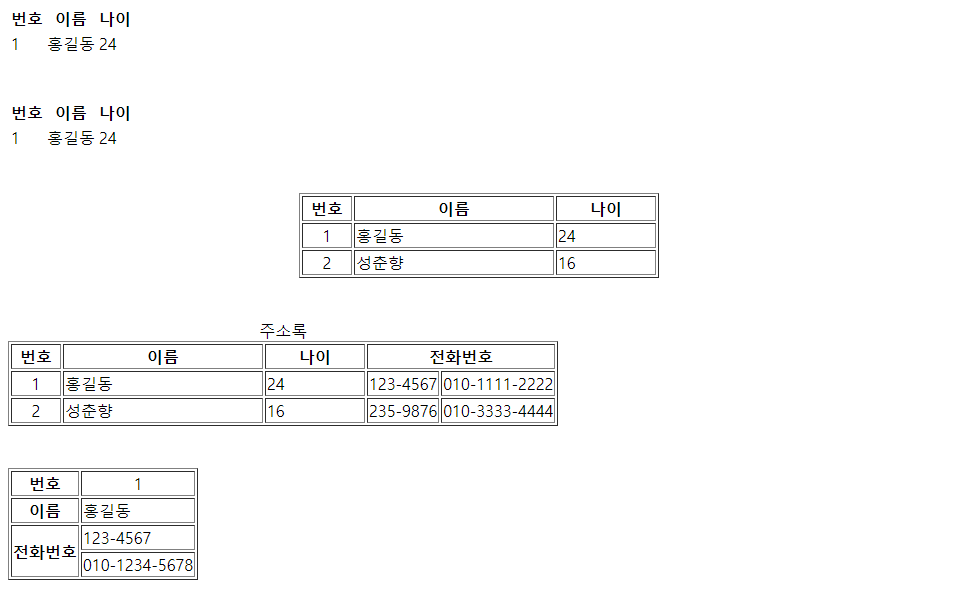
결과는,

Theme. <input>과 <form>

위 태그를 설명하면서, 다른 태그들도 함께 알아보자.

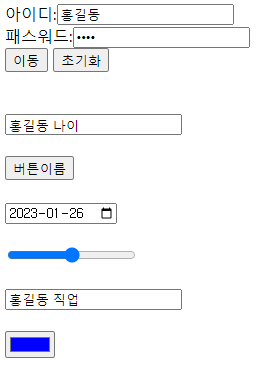
아래 두 코드와 결과를 확인해보자.

1
2
3
4
5
6
7
8
9
10
11
12
13
14
15
16
17
18
19
20
21
22
23
24
25
26
27
28
29
30
31
32
33
34
35
36
37
38
39
40
41
42
43
44
45
46
47
48
49
50
<!DOCTYPE html>
<html>
<head>
<meta charset="UTF-8">
<title>Insert title here</title>
</head>
<body>
 
<!--  
    link: 목적 -> 이동
-->
 
<!--  
    form: link의 목적
          JavaScript에서 접근하기 용이하다
    
    값을 전달할 시에 사용되는 attribute
    id: 현재 페이지에서 하나만 인식. JavaScript에서 접근할 목적이 있다.
    class: JavaScript에서 접근할 목적. CSS에서 주로 사용된다.
    name: (link시) 값을 전달할 목적 
-->
 
<form action="NewFile.jsp">
<input type="hidden" name="mynum" value="336">
아이디:<input type="text" name="id" placeholder="아이디입력"><br>
패스워드:<input type="password" name="pwd"placeholder="패스워드입력"><br>
 
<input type="submit" value="이동">
<input type="reset" value="초기화">
 
</form>
<br><br>
 
<input type="text" placeholder="이름입력">
<br><br>
<input type="button" value="버튼이름">
<br><br>
<input type="date">
<br><br>
<input type="range" max="10" min="0">
<br><br>
<input type="search" placeholder="검색어">
<br><br>
<input type="color" value="#0000ff">
<br><br>


</body>
</html>
cs


1
2
3
4
5
6
7
8
9
10
11
12
13
<%@ page language="java" contentType="text/html; charset=UTF-8"
    pageEncoding="UTF-8"%>
 
<%
String id = request.getParameter("id");
String password = request.getParameter("pwd");
System.out.println("id: " + id);
System.out.println("password: " + password);
 
String mynum = request.getParameter("mynum");
System.out.println("mynum: " + mynum);
%>
 
cs

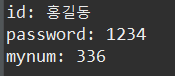
html로 작성된 파일을 브라우저에서 열고, <input> 태그를 통해 정보를 입력하면, jsp 파일에 전달된다.

console 에 결과가 나타난 모습


1
2
3
4
5
6
7
8
9
10
11
12
13
14
15
16
17
18
19
20
21
22
23
24
25
26
27
28
29
30
31
32
33
34
35
36
37
38
39
40
41
42
43
<!DOCTYPE html>
<html>
<head>
<meta charset="UTF-8">
<title>Insert title here</title>
</head>
<body>
 
CheckBox & Radio Button<br>
<!--  
    CheckBox: 독립적. on/off. 취미, 관심대상
    Radio Button: 세트로 구성
    select
-->
<form action="NewFile1.jsp">
<input type="radio" name="car" value="benz" checked="checked">벤츠<br>
<input type="radio" name="car" value="bmw">bmw<br>
<input type="radio" name="car" value="saab">사브<br>
<br>
<input type = "checkbox" name="hobby" value="패션">패션
<input type = "checkbox" name="hobby" value="음악감상">음악감상
<input type = "checkbox" name="hobby" value="게임">게임
<br><br>
 
<select name="sCar" multiple="multiple">
    <option value="벤츠" selected="selected">benz</option>
    <option value="비엠더블유">bmw</option>
    <option value="사브">saab</option>
    <option value="토요타">toyota</option>
 
</select>
<br><br>
 
<input type="submit" value="전송">
</form>
 
<br><br>
 
<textarea rows="10" cols="60" placeholder="자기소개글 작성"></textarea>
 
 
</body>
</html>
cs


1
2
3
4
5
6
7
8
9
10
11
12
13
14
15
16
17
18
19
20
<%@ page language="java" contentType="text/html; charset=UTF-8"
    pageEncoding="UTF-8"%>
<%
    String car = request.getParameter("car");
    System.out.println("자동차: " + car);
    
    String[] hobby = request.getParameterValues("hobby");
    
    if (hobby != null) {
        for (String s : hobby) {
            System.out.println(s);
        }
    }
    
    String[] carArr = request.getParameterValues("sCar");
    
    for (String s : carArr) {
        System.out.println(s);
    }
%>
cs

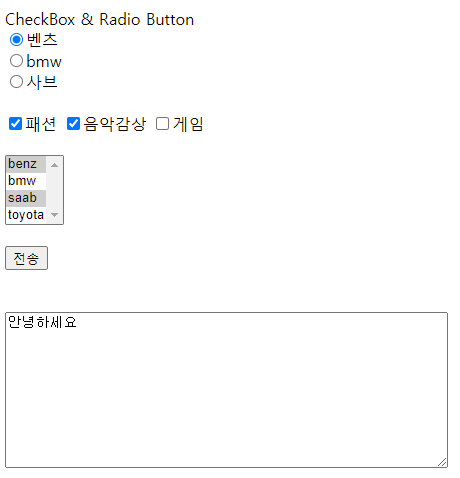
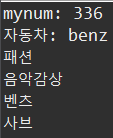
임의로 값을 입력한 결과는,


끝.

'HTML, CSS' 카테고리의 다른 글

HTML 기본 정리(2) - 사용자로부터 입력받기  (0) 2023.01.29
HTML 기본 정리(1)  (0) 2023.01.29
CSS 기초  (0) 2023.01.27
WEB - HTML & Internet  (0) 2023.01.25

HTML의 태그들을 비롯한 문법적인 내용에 앞서 WEB이 무엇인가에 대해 정리해보고자 한다.


Theme. Internet vs WEB


비유적으로 얘기해보면,

Internet이 도시라면 WEB은 그 도시 위 건물들 중에 하나이다.

Internet이 도로라면 WEB은 그 도로 위 자동차들 중 하나이다.

Internet이 운영체제라면 WEB은 그 운영체제 위 프로그램들 중 하나이다.

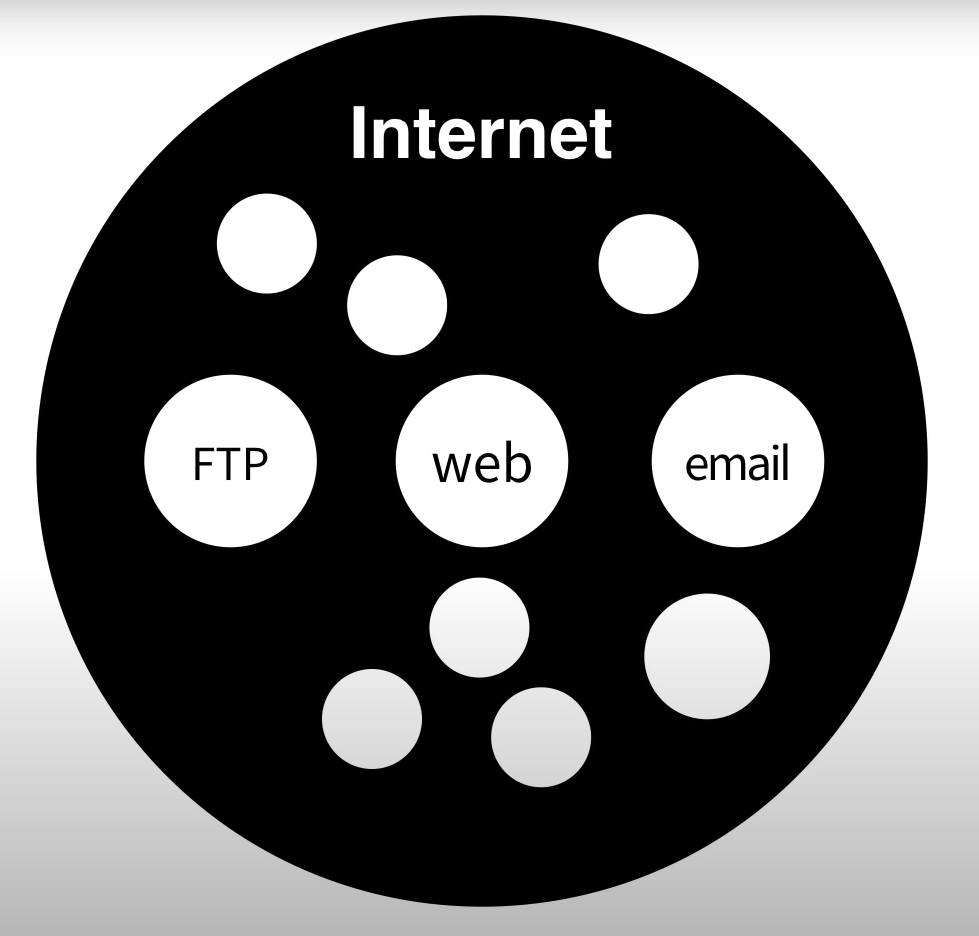
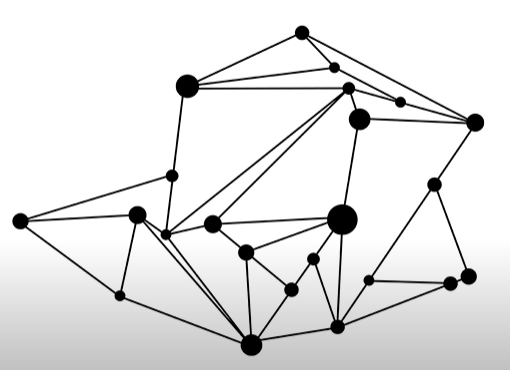
Internet은 다음과 같은 그림처럼 표현할 수 있다.

중앙이 없다. 즉, 각각의 통신장치들이 일종의 전화국과 같은 역할을 수행하고 있다.

수많은 통신장치들이 분산해 전화국과 같은 역할을 하고 있기 때문에 위 그림의 점들 중 하나가 사라져도 나머지 점들이 역할을 수행할 수 있는 통신 시스템이 Internet.


Theme. Internet의 동작 원리: 서버와 클라이언트


Internet이 동작하기 위해서 컴퓨터는 최소 2대가 필요하다. 즉, 2대의 컴퓨터가 서로 정보를 주고 받을 수 있어야 한다.

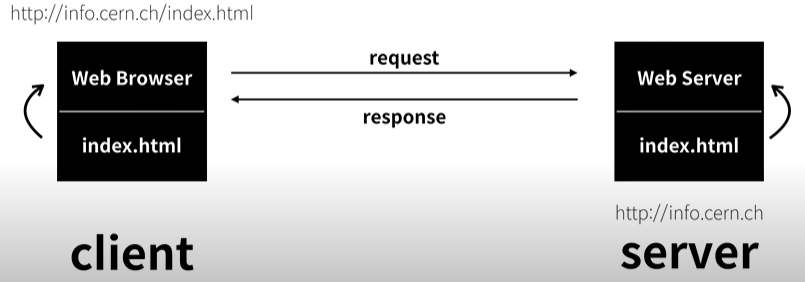
인터넷으로 연결된 두 대의 컴퓨터 중 하나는 Web Browser. 다른 하나는 Web Server의 프로그램을 설치되어 있다.

이때, Web Server가 설치된 컴퓨터의 하드 디스크에 index.html이라는 파일이 존재한다고 가정하자. 그리고 그 컴퓨터의 주소는 http://info.cern.ch이다. 

Web Browser에서 주소창에 http://info.cern.ch/index.html이라고  입력하고 실행하면, Internet을 통해 Web Server에 index.html 파일을 요청(request)한다. 

Web Server가 설치된 컴퓨터에서는 그 요청을 받고 하드디스크에서 해당 파일을 찾아 Web Browser가 설치된 컴퓨터에 다시 응답(response)한다.

그 결과 Web Browser가 설치된 컴퓨터에 index.html의 파일에 대한 정보가 도착하게 되고, 이를 Web Browser가 해석하여 화면에 나타낸다.


Theme. WEB hosting

 github와 같이 WEB hosting 서비스를 제공하는 원리에 대해 알아보자.

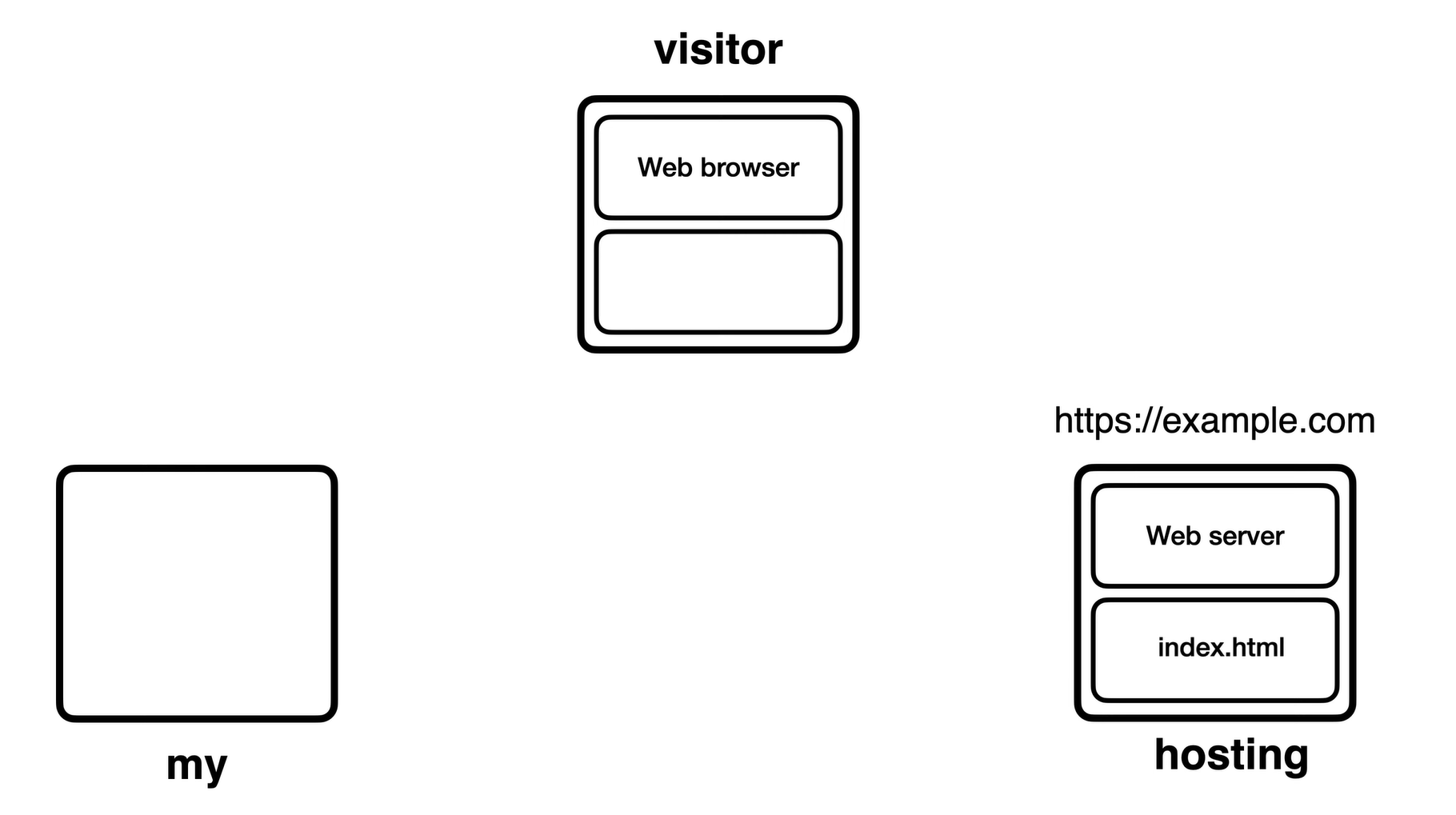
아래와 같이 내 컴퓨터(my)에는 index.html이라는 파일이 존재한다. 이때, 그 파일에 접근하고 싶어하는 visitor가 존재한다.

그리고 서비스를 제공해줄 hosting 업체가 존재한다.

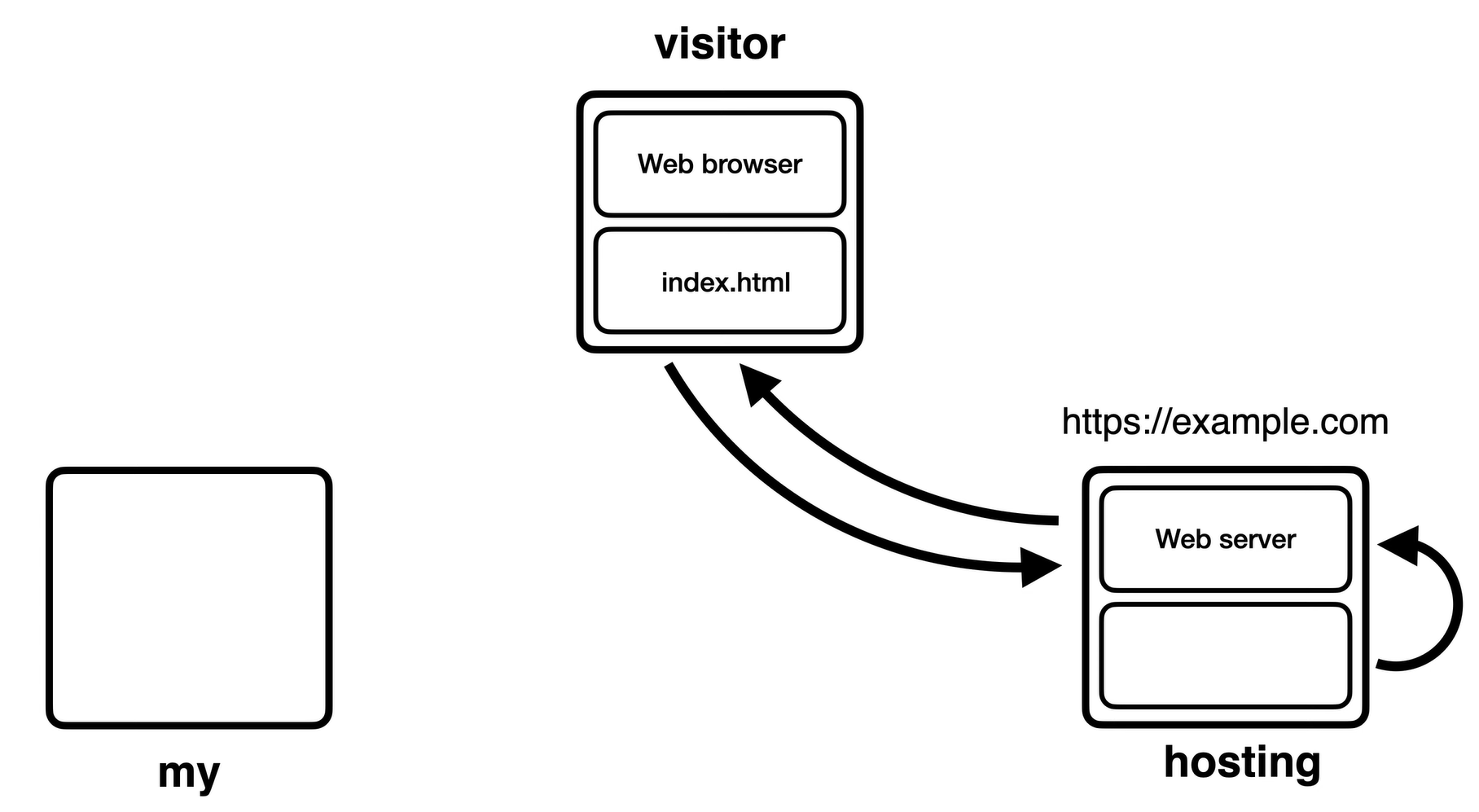
내 컴퓨터의 파일을 hosting 업체에 업로드 하면, WEB hosting에 설치되어 있는 WEB Server를 활성화 하고, 컴퓨터에 도메인을 부여한다.

이제 방문자가 도메인의 주소에 접속하면, Web Server가 해당 파일을 읽고, 방문자에게 파일의 소스 코드 등에 대한 정보를 제공한다. 이후 방문자의 Web Browser에 그 정보가 나타나게 된다.


'HTML, CSS' 카테고리의 다른 글

HTML 기본 정리(2) - 사용자로부터 입력받기  (0) 2023.01.29
HTML 기본 정리(1)  (0) 2023.01.29
CSS 기초  (0) 2023.01.27
HTML 기초  (0) 2023.01.26

+ Recent posts